Overview
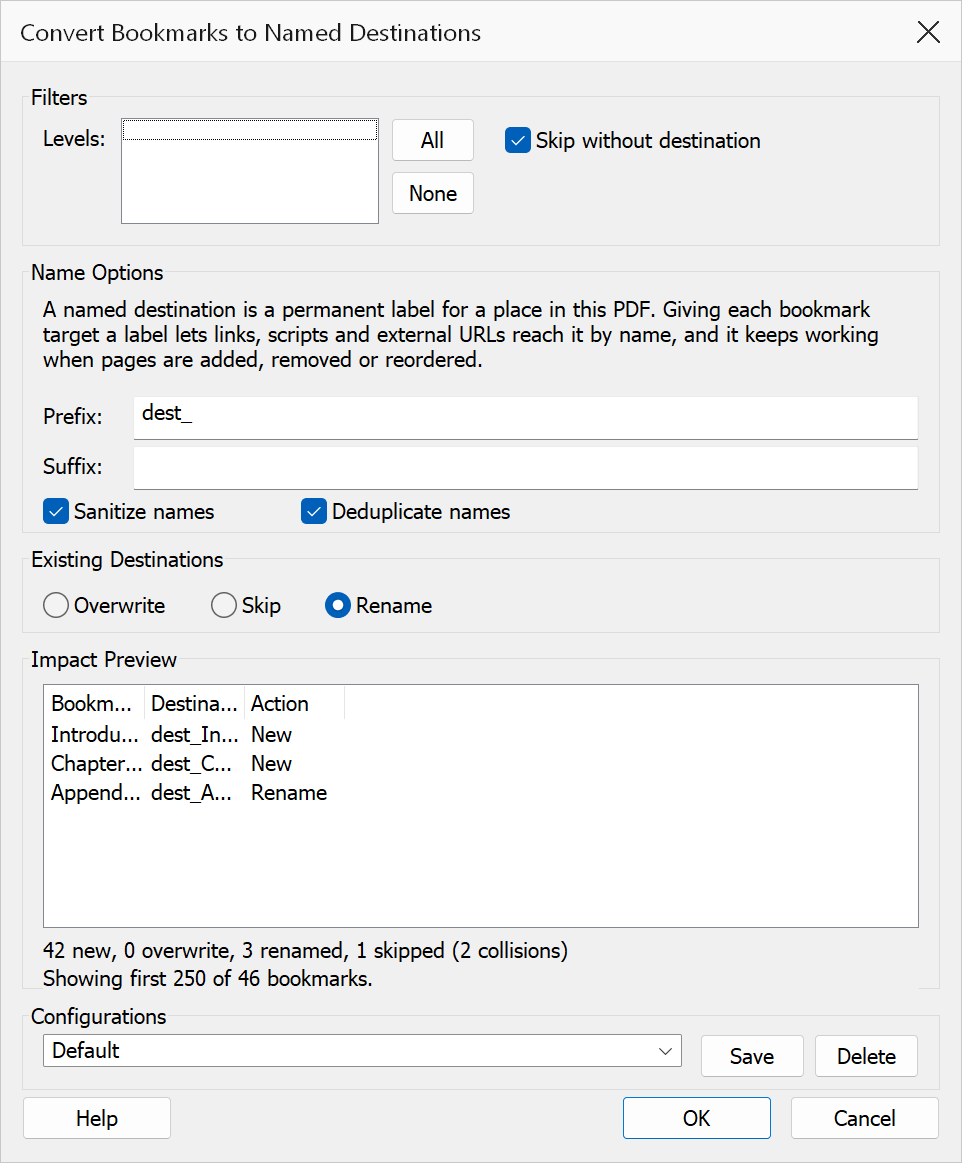
Convert Bookmarks to Named Destinations reads the bookmark tree and creates a named destination at each bookmark’s target location. Named destinations are reusable targets that can be referenced by bookmarks, links, or scripts. You control filtering, naming rules, and how existing destinations are handled.
How to use
- Open a PDF that contains bookmarks.
- Go to Plug-Ins > Bookmarks > Convert Bookmarks to Named Destinations.
- Apply filters to limit which bookmarks are converted.
- Set name options (prefix, suffix, sanitise, deduplicate).
- Choose how to handle existing destinations (overwrite, skip, or rename).
- Review the live preview table showing generated names and actions.
- Click OK to generate the destinations.
Filters
| Option | Description |
|---|---|
| Levels | A tick list of the bookmark levels the current document actually contains, numbered from 1 for the top level. The figure beside each level is how many of its bookmarks have a destination, so you can see the shape of the tree before choosing. Every level is ticked by default; untick the ones you want left alone, or use All and None to set them in one click. Bookmarks on unticked levels are reported as out of level range in the preview and completion summaries. If no level is ticked, nothing is converted and OK asks you to pick at least one. |
| Skip without destination | Ignores bookmarks that do not already point to a page destination. When unchecked, such bookmarks are still not converted (there is nothing to convert), but they are reported separately in the preview and completion summaries instead of being quietly skipped. Enabled by default. |
Name options
| Option | Description |
|---|---|
| Prefix | Text prepended to every generated destination name. |
| Suffix | Text appended to every generated destination name. |
| Sanitise names | Replaces characters that are not alphanumeric, underscore, hyphen, or period with underscores. Enabled by default. |
| Deduplicate names | Appends a numeric suffix (_1, _2, etc.) when
multiple bookmarks would produce the same destination name. Enabled by
default. |
Existing destination handling
| Policy | Description |
|---|---|
| Overwrite | Replaces the existing destination with the newly generated one. |
| Skip | Keeps the existing destination unchanged and does not create a duplicate. |
| Rename | Creates the destination with a unique name (appending a numeric suffix) to avoid the conflict. This is the default policy. |
Preview
The preview table at the bottom of the dialog shows three columns:
- Bookmark Title — the original bookmark text.
- Destination Name — the generated destination name.
- Action — one of new, overwrite, rename, or skip.
A summary line reports counts for new, overwritten, renamed, skipped, and collision entries, plus any bookmarks that are out of level range or have no destination. For performance, the preview is limited to the first 250 rows.
Tip
Set a prefix such as chap_, enable Sanitise names
and Deduplicate names to produce clean, unique, link-friendly
destination names.
Note
If a generated destination name is empty after applying prefix, suffix, and
sanitisation, the fallback base name Bookmark is used. New
destinations are created with a PDF /Fit view at the
bookmark’s page.