Overview
Convert Links to Named Destinations scans GoTo link annotations in the selected pages, creates a named destination for each link target, and updates the link to point at the new named destination. This helps standardise links and makes destinations easier to reuse across documents and scripts.
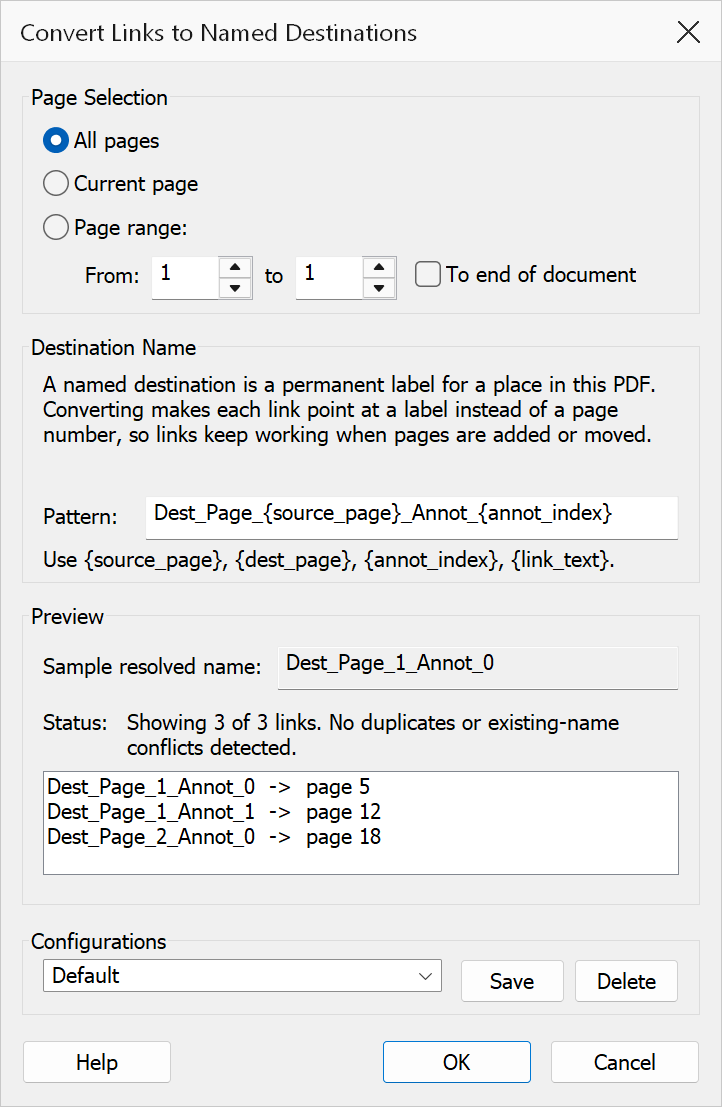
How to use
- Open a PDF that contains link annotations.
- Go to Plug-Ins > Links > Convert Links to Named Destinations.
- Select the page scope: current page or a page range.
- Enter a destination name pattern using the available placeholders.
- Review the live preview of generated names and conflict markers.
- Click OK to convert the links.
Page scope
| Option | Description |
|---|---|
| Current page only | Converts links on the currently viewed page. |
| Page range | Converts links across a range of pages. Enter a start page and either specify an end page or choose To document end. |
Destination name pattern
The Pattern field controls how named destinations are named. The
default pattern is Dest_Page_{source_page}_Annot_{annot_index}.
| Placeholder | Replaced with |
|---|---|
{source_page} |
The 1-based page number containing the link annotation. |
{dest_page} |
The 1-based page number the link points to. |
{annot_index} |
The 0-based index of the link annotation on its source page. |
{link_text} |
The first line of text found within the link bounds. |
If the pattern resolves to an empty string, a fallback name of
Dest_Page_N_Annot_N is generated automatically.
Preview
The dialog shows a live preview of the first generated destination names for links in the selected scope. Each entry is annotated with markers when a conflict is detected:
- [duplicate] — multiple links in scope would produce the same destination name.
- [exists: overwrite], [exists: skip], or [exists: rename] — the name already exists in the document; the label shows the active conflict policy.
A status line reports the total number of links in scope, the number of duplicate names, and the number of existing-name collisions.
Conflict handling
When a generated destination name already exists in the document, the behaviour depends on the policy set before opening the dialog:
| Policy | Description |
|---|---|
| Overwrite | Replaces the existing destination with the newly generated one. |
| Skip | Keeps the existing destination and does not create a duplicate. |
| Rename | Creates the destination with a unique name to avoid the conflict. |
Tip
Include {link_text} in the pattern to produce human-readable
destination names that reflect the link’s visible text.
Note
Links without resolvable GoTo destinations are skipped. The pattern field must not be empty — the OK button is disabled until a valid pattern is entered.