Overview
Run TOCBuilder Configuration is TOC Builder's command for Acrobat's Action Wizard (Guided Actions). Add it as a step in an action and it runs a saved TOCBuilder configuration on every document the action processes — no dialogs, no clicks per file.
A configuration is a named preset saved with the Save button inside a TOCBuilder dialog. The command currently offers two operations:
| Operation | Runs | Where its configurations are saved |
|---|---|---|
| Generate Table of Contents | The TOCBuilder TOC generator, exactly as the batch interface runs it. | The main TOCBuilder dialog. |
| Create Bookmarks from Styles | Font-style bookmark generation, headless. | The Bookmark from Styles dialog. |
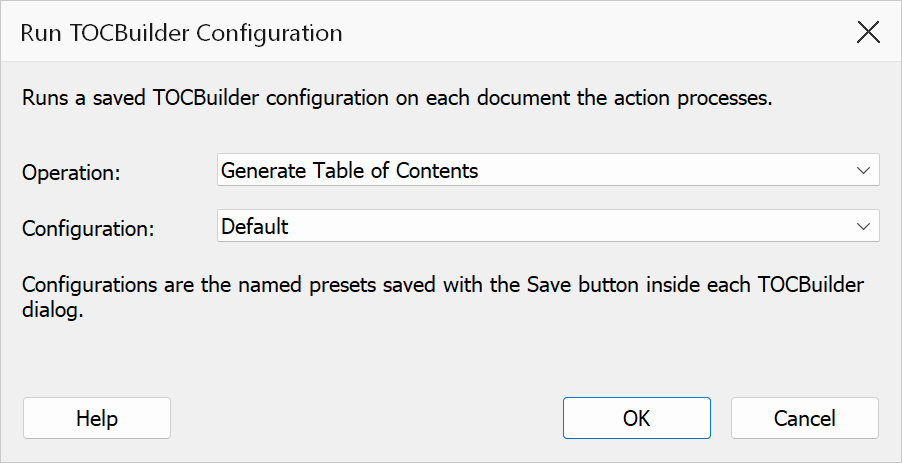
How to use
- Save a configuration first: open the operation's dialog, set it up, type a name in the Configurations box and click Save.
- In Acrobat, open Tools > Action Wizard and create or edit an action.
- Add the Run TOCBuilder Configuration command (Mapsoft group) as a step.
- Open the step's options and choose the Operation and the Configuration to run.
- Save the action and run it on your files or folders.
Note
Action Wizard requires Adobe Acrobat Pro. The command runs with batch behaviour: confirmation prompts are suppressed, so what the configuration says is what happens.
If the step reports an error
- No configuration chosen — open the step's options and pick one; a freshly added step has nothing selected yet.
- The configuration was renamed or deleted — the step stores the name, so re-select it after renaming.
- The document is protected — the operation needs permission to modify the file.