Overview
Export URLs searches the active PDF for link annotations with “Open a web link” actions and extracts all web addresses (URLs). The extracted URLs can be saved to a CSV file, exported as an HTML report with clickable hyperlinks, and optionally opened in the default web browser.
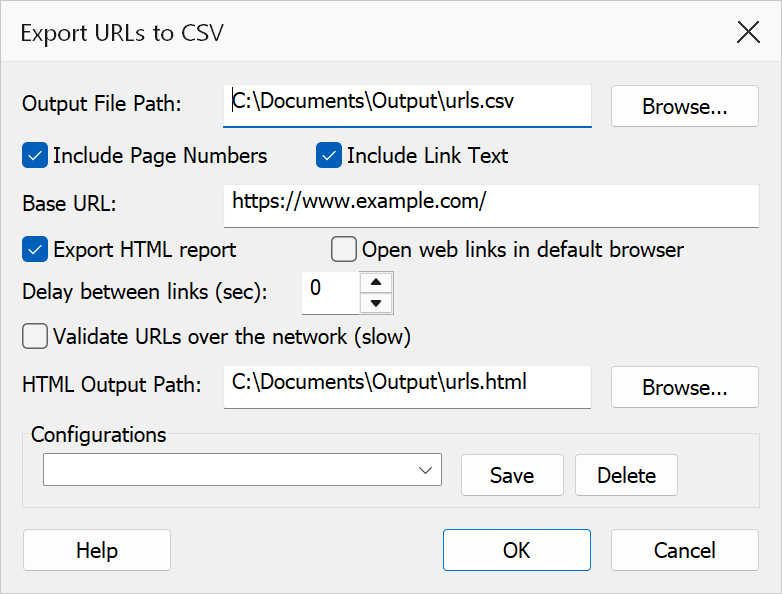
How to use
- Open the PDF you want to analyse.
- Go to Plug-Ins > Links > Export URLs.
- Set the CSV output file path using the Browse button.
- Configure the optional settings (page numbers, link text, HTML export, browser integration).
- Click OK to generate the export.
CSV output settings
| Option | Description |
|---|---|
| Output file path | Full path to the CSV file where extracted URLs will be saved. |
| Include page number | Adds the page number where each link annotation appears as an additional CSV column. |
| Include link text | Adds the visible link text (anchor) when available as an additional CSV column. The text is read from the page in whatever language it uses; the CSV is written as UTF-8 with a byte order mark so it opens correctly in Excel. |
| Base URL | Optional prefix prepended to relative URLs during export. Leave empty to export URLs exactly as they appear in the document. |
| Validate URLs over the network | Contacts each URL and records whether it responds, in the report’s validity column. Off by default: validation makes one network request per link and Acrobat waits while the requests run, so large documents take a long time. Leave it off to export the URLs without checking them. Under Acrobat’s Protected Mode the checks are made by MapsoftBroker.exe; if it is not installed the option is unavailable. Protected Mode also only lets the plug-in write to files chosen with Browse: if a typed or saved path cannot be written, you are asked to choose the file. |
HTML export
| Option | Description |
|---|---|
| Export HTML report | Creates an HTML file containing a table of clickable hyperlinks. The HTML output path control is enabled when this option is checked. |
| HTML output path | Full path to the HTML report file. Only required when the HTML report is enabled. |
Browser integration
| Option | Description |
|---|---|
| Open web links in default browser | Launches each extracted URL directly in the system default browser. This does not use the HTML report, so no HTML file path is needed. |
| Delay between links (seconds) | Number of seconds to wait before opening the next link. Set to 0 to
open all links immediately. Accepts values from 0 to 3600. |
Tip
Use the HTML export to quickly review all hyperlinks in a document. The report includes clickable links for easy verification.
Note
Relative URLs are exported as-is unless you specify a base URL. Some links may not contain visible anchor text.