Overview
Change Bookmark Zoom Type updates the zoom/view destination for bookmarks in the active PDF. This affects only bookmarks with Go to a page in this document and Go to a page in another document actions. You can apply the change to all bookmark levels, a single level, or a range of levels.
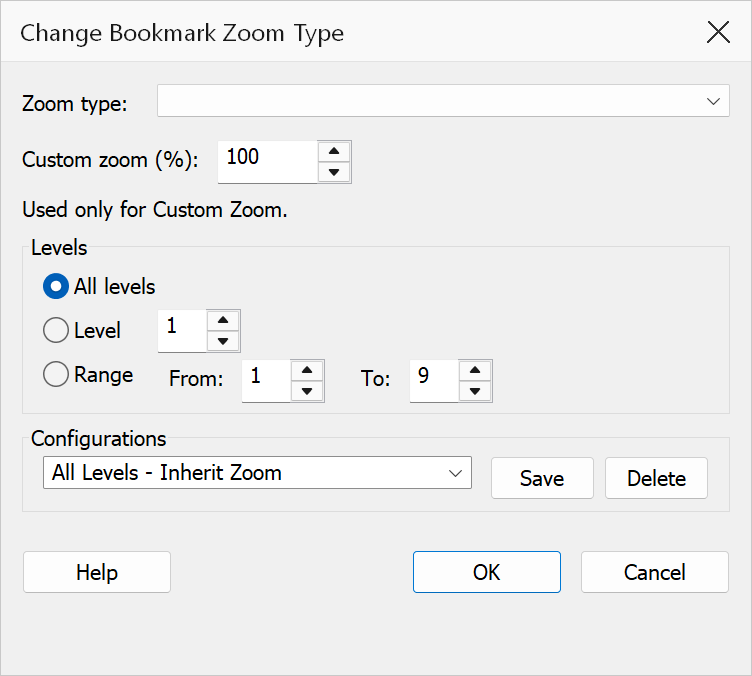
How to use
- Open a PDF that contains bookmarks.
- Go to Plug-Ins > Bookmarks > Manage & Organize > Change bookmark zoom type.
- Select a zoom type from the dropdown.
- If you choose Custom Zoom, enter a zoom percentage (1–1000%).
- Choose the level scope: All levels, a single level, or a level range.
- Click OK to apply the new zoom type.
Zoom types
| Zoom type | Description |
|---|---|
| Fit Page | Fits the entire page within the viewer window. |
| Fit Width | Fits the page width to the viewer window, allowing vertical scrolling. |
| Fit Visible | Fits the visible content area (bounding box) to the viewer window width. |
| Inherit Zoom | Keeps the current zoom level unchanged when the bookmark is clicked. This is a popular choice for consistent navigation. |
| Actual Size | Displays the page at 100% zoom (1:1 pixel mapping). |
| Custom View | Sets each bookmark to a Fit Rectangle destination using the page bounds. |
| Custom Zoom | Sets a specific zoom percentage. Enter a value between 1 and 1000 in the adjacent field. The value is stored internally as a fraction (e.g., 125 becomes 1.25). |
Level scope
| Option | Description |
|---|---|
| All levels | Changes the zoom type for every bookmark in the tree. |
| Level | Changes only bookmarks at the specified single level. |
| Level range | Changes bookmarks within the specified start and end levels (inclusive). The start level cannot be greater than the end level. |
Tip
Converting bookmarks to Inherit Zoom is one of the most common bookmark maintenance tasks. It ensures readers stay at their preferred zoom level when clicking bookmarks. See the User Guide for more details.
Note
Bookmarks that do not have a page destination (e.g., URI actions, JavaScript actions) are not affected by this operation. The default selection is Inherit Zoom.