Overview
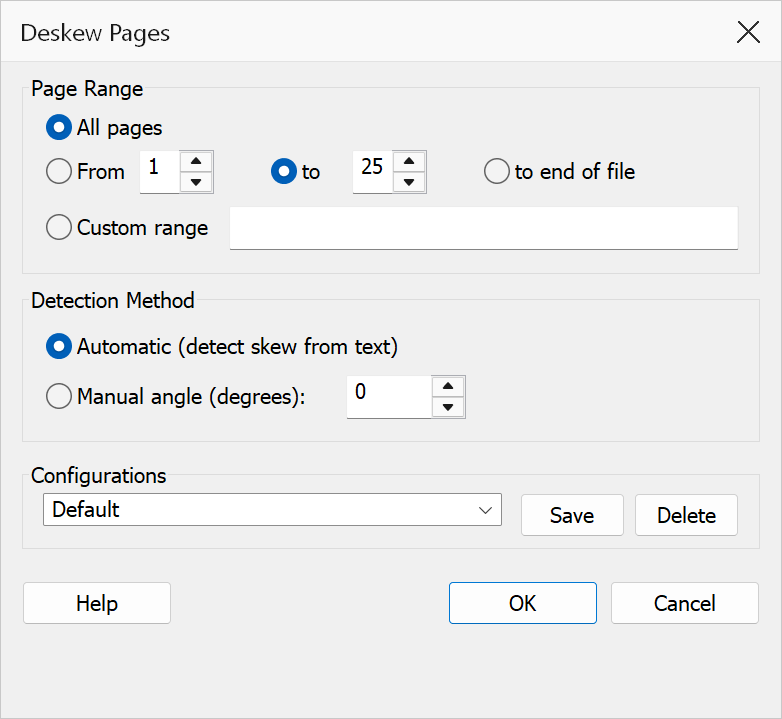
Deskew Pages straightens skewed or slightly rotated page content. Scanned documents often have pages that are tilted by a small angle due to misalignment during scanning. This feature detects the skew angle (or accepts a manual value) and applies a counter-rotation transform to the content stream to straighten it.
How to use
- Open a PDF document in Acrobat.
- Go to Plug-Ins > Pages > Deskew Pages.
- Select the page range to deskew.
- Choose the detection method: Automatic or Manual.
- If using Manual, enter the skew angle in degrees.
- Click OK to apply the correction.
Options
| Option | Description |
|---|---|
| Page range | The pages to deskew. Choose All pages or specify a From / To range. |
| Detection method | Choose Automatic to let the plug-in detect the skew angle by analysing text baselines using PDWordFinder, or Manual to enter a specific rotation angle. |
| Manual angle | The rotation angle in degrees to apply. Positive values rotate content clockwise; negative values rotate counter-clockwise. Only available when Manual detection is selected. |
Tip
For best results with Automatic detection, ensure the document contains substantial horizontal text. The algorithm analyses text baselines to determine the skew angle, so pages with mostly images or diagonal text may not be detected accurately.
Warning
Automatic detection works best with text-heavy documents. Pages that contain primarily images, diagrams, or non-horizontal text may produce inaccurate results. Use Manual mode for such pages.