Overview
See PDF Internals opens a read-only explorer for the low-level object structure (the COS object graph) of the active PDF, starting at the document Catalog. Use it to inspect dictionaries, arrays, streams, and values when diagnosing a document — nothing in this dialog modifies the PDF.
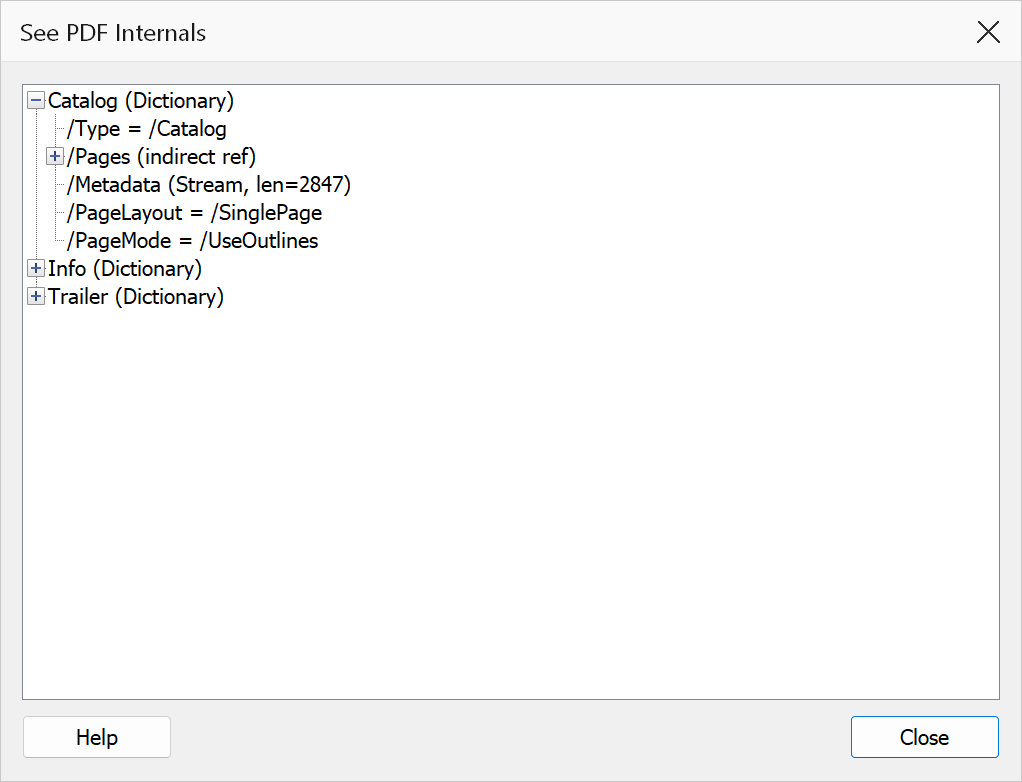
How to use
- Open the PDF you want to inspect.
- Go to Plug-Ins > Bookmarks > Utilities > See PDF Internals (or press
Ctrl+Shift+Alt+E). - Expand nodes in the tree to explore the structure. Containers load their children on demand, so large PDFs open instantly.
- Select a node to see its full, untruncated value in the detail pane below the tree.
- Type a term in the search box and click Search to highlight matching nodes; Clear removes the highlights.
- Right-click a node to copy its path or value to the clipboard (see below).
Context menu commands
Right-click any node in the tree to open its context menu:
| Command | Description |
|---|---|
| Copy Path | Copies the node's structural path (for example /Catalog/Pages/Kids[0]) to the clipboard. |
| Copy Value | Copies the node's value as shown in the detail pane. |
| Copy Full Detail | Copies the complete detail text for the node, including its path, type, and value. |
Tip
These copy commands are available only on the right-click menu. You can also
select text directly in the detail pane and press Ctrl+C.
Note
The explorer is read-only and safe to use on any document. Reference cycles between indirect objects are detected and marked rather than expanded forever, and expansion depth is limited to keep the tree responsive.