
TOCBuilder
Effortlessly Create PDF Table of Contents with Ease. Say goodbye to endless scrolling and transform your PDF navigation.
Last updated March 2026

Try it online first. You can generate a PDF table of contents online for free — no installation, no licence. The plug-in below brings the same engine into Acrobat with batch processing.
Overview
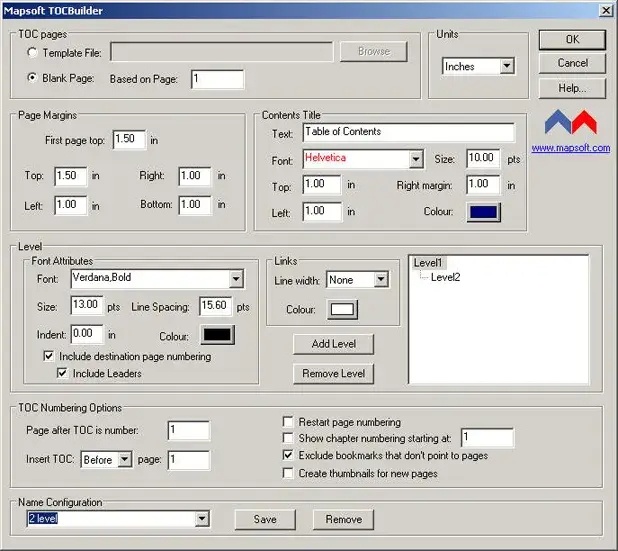
TOCBuilder is an Adobe Acrobat plug-in designed to automatically generate professional tables of contents for PDF documents. Whether you are working with lengthy reports, technical manuals, or multi-chapter publications, TOCBuilder transforms navigation by adding a fully linked, customisable table of contents directly within the PDF.
Key Features
Powerful tools to create structured, navigable PDF documents.
Automatic Generation
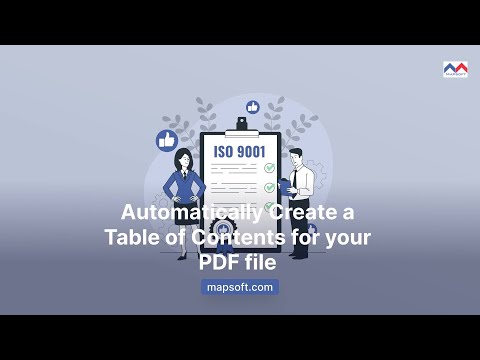
Automatically create a complete table of contents for any PDF file, analysing the document structure to build entries.
Easy Linking
Each TOC entry is automatically linked to its corresponding page, enabling one-click navigation throughout the document.
Customisable Appearance
Control the look and feel of your table of contents, including fonts, styles, indentation, and formatting to match your branding.
Enhanced Navigation
Transform how readers interact with your PDFs by giving them an instant overview of the entire document structure.
Adobe Acrobat Integration
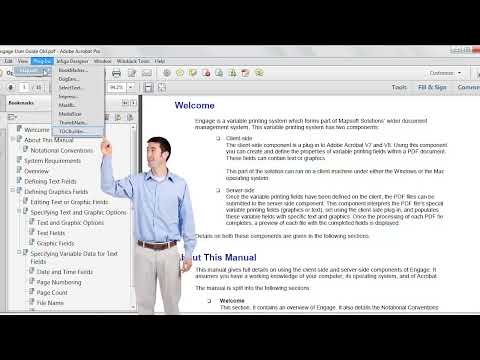
Works as a native Adobe Acrobat plug-in, integrating seamlessly into your existing PDF workflow without additional software.
Professional Output
Produce polished, publication-quality tables of contents that elevate the professionalism of your documents.
Use Cases
TOCBuilder is ideal for anyone working with multi-page PDF documents.
Technical Documentation
Add structured tables of contents to technical manuals, user guides, and specifications for easy reference.
Reports & Proposals
Enhance business reports and proposals with a professional TOC that helps readers find key sections quickly.
Legal & Compliance Documents
Navigate lengthy legal filings, contracts, and compliance documentation with a clickable table of contents.
Publishing & eBooks
Create reader-friendly navigation for digital publications, course materials, and multi-chapter documents.
Efficiency Meets Accessibility
TOCBuilder helps organisations meet both efficiency and accessibility goals. By automating structured navigation — like tables of contents and bookmarks — you ensure documents are logically organised, easy to navigate, and more user-friendly. That supports general ISO-aligned professionalism while also making content more accessible — a practical win on both fronts.
Resources
Learn more about TOCBuilder and get started today.
System Requirements
Adobe Acrobat
Adobe Acrobat Pro or Standard (DC, 2020, or 2017). Not compatible with Adobe Acrobat Reader.
Operating System
Windows 10 or Windows 11 (64-bit recommended). Both 32-bit and 64-bit Acrobat installations are supported.
Licence
Perpetual licence with free maintenance period. See licence details and upgrade policy.
See It in Action

Related Articles
Understanding the Table of Contents
The table of contents is crucial for efficient navigation through large documents, allowing quick access to chapters. Learn how to construct and use a TOC effectively.
PDF Bookmarks: A Complete Guide
A complete guide to PDF bookmarks: what they are, how they work in the PDF specification, how Acrobat generates them, and how to automate their creation.
How to Merge PDFs in Adobe Acrobat
Learn how to merge PDF files in Adobe Acrobat using the Combine Files tool, Insert Pages, and JavaScript. Covers bookmarks, form fields, and PDF/A compliance.
Related Products
Bookmarker
Create PDF bookmarks automatically from document structure — works hand-in-hand with TOCBuilder for full navigation.
DogEars
Mark and extract PDF pages with ease — a handy companion for navigating large documents alongside your table of contents.
“The new features are fantastic. This is my favourite plugin of all time.”
Mark Kelcinski — Dynamic Designs
Frequently Asked Questions
How do I automatically create a table of contents in a PDF?
Use TOCBuilder, an Adobe Acrobat plug-in that scans a PDF’s existing bookmarks or text structure and inserts a fully linked table of contents as new pages in the document. It works on PDFs that no longer have a source file.
Does Adobe Acrobat have a built-in table of contents feature?
Acrobat shows bookmarks in a side panel but does not create a printable, page-level table of contents inside the PDF itself. TOCBuilder fills that gap by inserting an actual TOC into the document, with clickable links and fully customisable formatting.
Is TOCBuilder compatible with Acrobat Pro and Standard?
Yes. TOCBuilder works with Adobe Acrobat Pro and Acrobat Standard (DC, 2020, and 2017) on Windows 10 and Windows 11. It does not run inside Adobe Acrobat Reader, which does not support third-party plug-ins.
Can TOCBuilder batch-process multiple PDFs?
Yes. TOCBuilder supports batch processing, so you can apply the same TOC generation rules to many PDFs in one operation — useful for technical documentation, multi-volume reports, and publishing workflows.
What is TOCBuilder v2 and do current buyers get it?
TOCBuilder v2 is the upcoming major release. Every TOCBuilder licence purchased today is automatically upgraded to v2 — free of charge — when it ships. No separate purchase, no upgrade fee.
Need Something More?
If this product doesn't quite meet your requirements, we can help. With over 30 years of Adobe development expertise, our team can modify existing products or build entirely custom solutions tailored to your specific workflow. Whether you need additional features, integration with your systems, or a completely bespoke tool, get in touch to discuss your needs.
We also welcome suggestions for new features and new product ideas. If we hear enough requests for a particular capability, it moves up our development priority list — so your feedback directly shapes what we build next.
Beyond off-the-shelf plug-ins, we also build enterprise PDF solutions on the Adobe PDF Library — server-side document processing, generation, validation, conversion and redaction pipelines for high-volume environments. If your need is bigger than a desktop tool, our PDF Library team can build it.
Ready to Add Professional Navigation to Your PDFs?
$149 or $90/yr
One-time purchase · includes 1 year of updates · perpetual licence
Free upgrade to TOCBuilder v2 when it ships — no extra cost.