
MediaSizer
An Adobe Acrobat plugin that allows you to change and rescale the media size of PDFs, adapting documents for various output requirements.
Overview
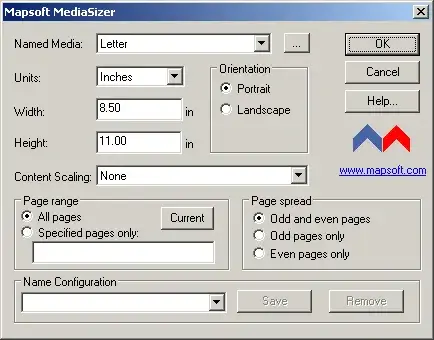
MediaSizer is an Adobe Acrobat plugin designed for professionals who need to change and rescale the media size of PDF documents. Whether you are preparing files for a specific printer, adapting page dimensions for regulatory submissions, or standardising page sizes across a document set, MediaSizer provides the tools you need.
The plugin integrates directly into Adobe Acrobat, giving you an intuitive interface to adjust media sizes without leaving your familiar workflow. It handles the complexity of rescaling content alongside page dimensions, ensuring your documents look correct at any size.
Key Features
Powerful page dimension tools for optimal PDF output.
Change Media Size
Modify the media (page) size of any PDF to match your target dimensions, from standard paper sizes to custom formats.
Rescale Content
Automatically rescale page content to fit the new media dimensions, preserving layout integrity and proportions.
Standard & Custom Sizes
Select from common paper sizes (A4, Letter, Legal, etc.) or define entirely custom dimensions to suit your needs.
Optimise for Output
Adapt PDF media sizes for specific printers, displays, or submission systems that require particular page dimensions.
Crop & Trim Box Control
Manage crop, trim, bleed, and art boxes alongside media size changes for precise print-ready output.
Seamless Acrobat Integration
Access MediaSizer directly from the Adobe Acrobat interface as a native plugin with an intuitive control panel.
Common Use Cases
- Convert documents between paper sizes (e.g., Letter to A4 or vice versa)
- Prepare PDFs for large-format printing by rescaling to poster dimensions
- Standardise page sizes across documents from multiple sources
- Adjust media size for regulatory or compliance submissions
- Resize pages for optimal on-screen viewing or digital distribution
- Set precise crop, trim, and bleed boxes for prepress workflows
Resources
Get started with MediaSizer using the guides and downloads below.
User Guide
Complete documentation covering all MediaSizer features and configuration options.
Download Trial
Try MediaSizer free before you buy. Full functionality with a trial period.
System Requirements
Adobe Acrobat
Adobe Acrobat Pro or Standard (DC, 2020, or 2017). Not compatible with Adobe Acrobat Reader.
Operating System
Windows 10 or Windows 11 (64-bit recommended). Both 32-bit and 64-bit Acrobat installations are supported.
Licence
Perpetual licence with free maintenance period. See licence details and upgrade policy.
Need to Change Your PDF Page Sizes?
MediaSizer makes resizing and rescaling PDFs simple. Get in touch or try it today.