Overview
Auto-Rename PDF Files renames every PDF in a folder using a naming
pattern built from tokens: document metadata, extracted page text, dates, and counters.
Combined with the CSV lookup table, it can turn a folder of scanner output like
scan001.pdf into meaningfully named files based on what each document
actually contains.
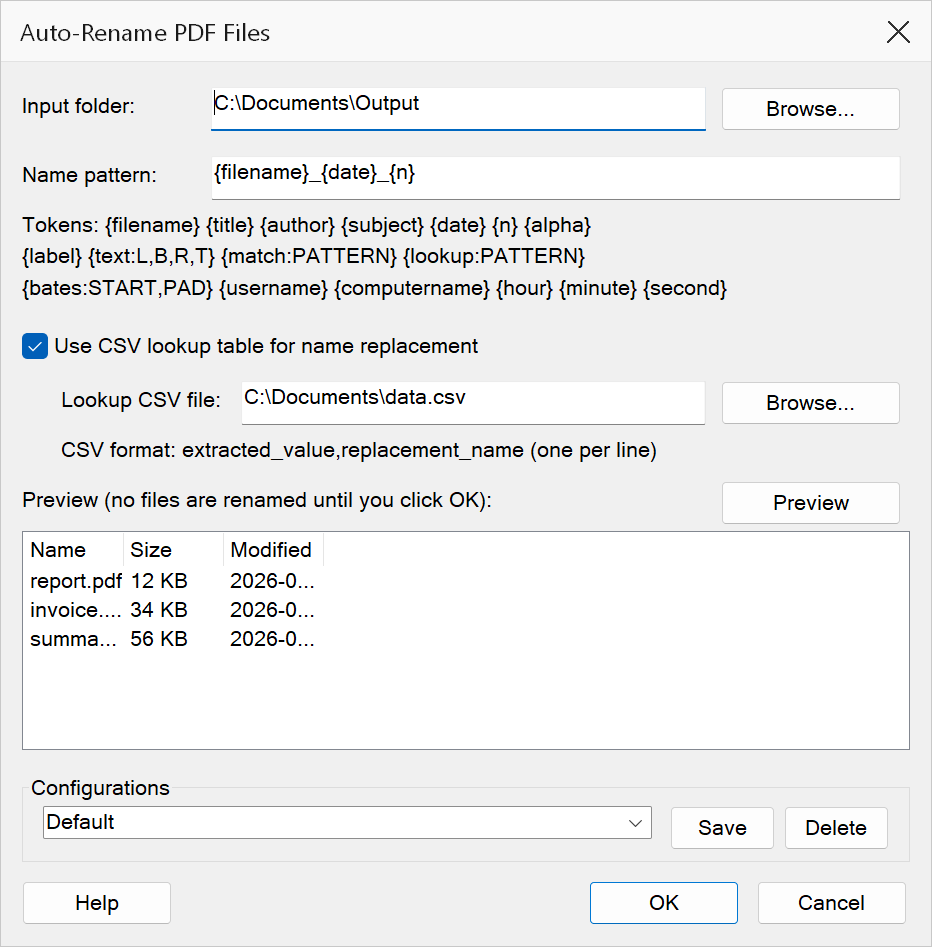
How to use
- Go to Extensions > Mapsoft > Auto-Rename PDF Files.
- Set the Input folder containing the PDFs to rename.
- Enter a Name pattern using the tokens below.
- Optionally enable the CSV lookup table to map extracted values to replacement names.
- Click Preview to see what each file would be renamed to. Nothing is renamed until you click OK.
- Click OK. Files are renamed in place.
Naming tokens
| Token | Expands to |
|---|---|
{filename} | The file's current name, without extension. |
{title} {author} {subject} |
Document metadata fields. |
{n} | A three-digit counter (001, 002, …). |
{alpha} | An alphabetic counter (A, B, … AA, AB). |
{date} | Today's date as YYYY-MM-DD. |
{hour} {minute} {second} |
The current time, zero-padded. |
{label} | The page label of the first page, honouring its numbering style (i, ii… / A, B…). |
{text:L,B,R,T} | Text extracted from a rectangle on the first page, in PDF points measured from the bottom-left corner. |
{match:PATTERN} | The first regular-expression match (or its first capture group) found in the first page's text. |
{bates:START,PAD} | A Bates-style number beginning at START, zero-padded to PAD digits, advancing per file. |
{username} {computername} |
The Windows user and machine name. |
{lookup:PATTERN} | Extracts text with the regular expression PATTERN, then replaces it with the matching entry from the CSV lookup table (or with the extracted text itself when the table has no entry for it). |
CSV lookup table
Enable Use CSV lookup table and choose a CSV file of
extracted_value,replacement_name pairs, one per line. Use this to translate
codes found on the page — an account number, a form ID — into human-readable
names.
The table is applied two ways. The {lookup:PATTERN} token looks up whatever
that pattern extracted from the page and substitutes the mapped value, which is the
precise way to use it. In addition, the whole filename stem produced by the pattern is
looked up, so a pattern that produces just the extracted code still resolves.
Note
Renaming never overwrites an existing file: when two inputs produce the same name, or
the target already exists, the later file gets a (2)-style suffix
instead. The completion message reports how many collisions were resolved this way.
Tip
Test a new pattern on a copy of a few files first. A token that matches nothing expands
to an empty string, so a pattern that relies entirely on {match:…}
can produce very short names when the pattern fails to match.