Overview
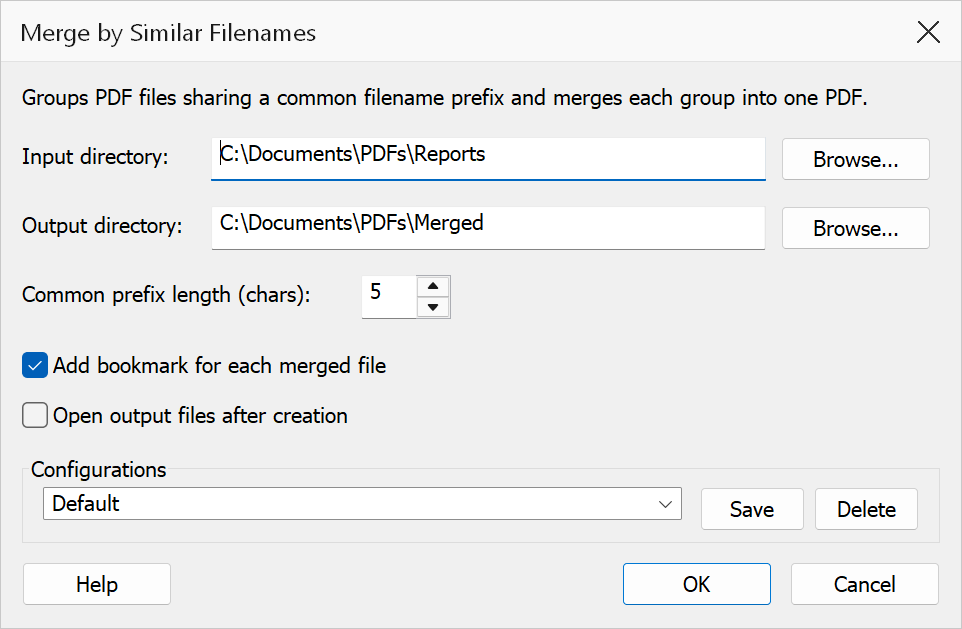
Merge by Similar Filenames groups PDF files that share a common filename prefix and merges each group into a single PDF. You specify how many characters from the start of each filename are used to determine the grouping. This is useful when you have a collection of related files that follow a naming convention and need to be consolidated by their common prefix.
How to use
- Go to Extensions > Mapsoft > Merge by Similar Filenames.
- Set the Input directory containing the PDF files you want to group and merge.
- Set the Output directory where the merged PDFs will be saved.
- Set the Common prefix length to control how many characters from the start of each filename are used for grouping (default is 5).
- Optionally enable Add bookmark for each merged file and Open output files after creation.
- Click OK to perform the merge.
Options
| Option | Description |
|---|---|
| Input directory | The folder containing the PDF files to group and merge. All PDF files in this directory are considered. |
| Output directory | The folder where merged output PDFs are saved. Each output file is named using
the common prefix followed by _merged.pdf (e.g.
Repor_merged.pdf). |
| Common prefix length | The number of characters from the start of each filename (excluding extension) used to determine grouping. The default is 5. Files whose names share the same leading characters (up to this length) are placed into the same group. |
| Add bookmark for each merged file | When enabled, a bookmark is created in the merged PDF for each source file, using the source file name as the bookmark title. |
| Open output files after creation | When enabled, each merged PDF is opened in Acrobat after it is created. |
How it works
Files in the input directory are sorted alphabetically, then grouped by the first
N characters of their filename stem (the name without the .pdf
extension), where N is the common prefix length. Each group that contains two
or more files is merged into a single output PDF named
{prefix}_merged.pdf. Groups with only one file are skipped.
Example
With a Common prefix length of 5, the following files would be grouped by their first five characters:
Report_Jan.pdf,Report_Feb.pdf,Report_Mar.pdf— common prefixRepor→ merged intoRepor_merged.pdfInvoice_001.pdf,Invoice_002.pdf— common prefixInvoi→ merged intoInvoi_merged.pdf
Tip
Choose a prefix length that captures the meaningful common part of your filenames.
If your files are named ProjectA_Doc1.pdf and
ProjectA_Doc2.pdf, a prefix length of 8 would group them by
ProjectA.
Note
Files within each group are merged in alphabetical order. Groups containing only a single file are not processed. Configurations can be saved and loaded for repeated use.