Overview
Bookmarks from Expressions creates bookmarks from regular-expression matches in the document text. Build a list of rules — each one a pattern, the bookmark level its matches land on, and an optional title template — and the command bookmarks every match of every rule, nesting the results into a tree by their levels in page order.
One rule matching Chapter\s+\d+ at level 1 and another matching
Section\s+\d+\.\d+ at level 2 produce chapters with their sections
nested underneath, exactly as they occur in the document.
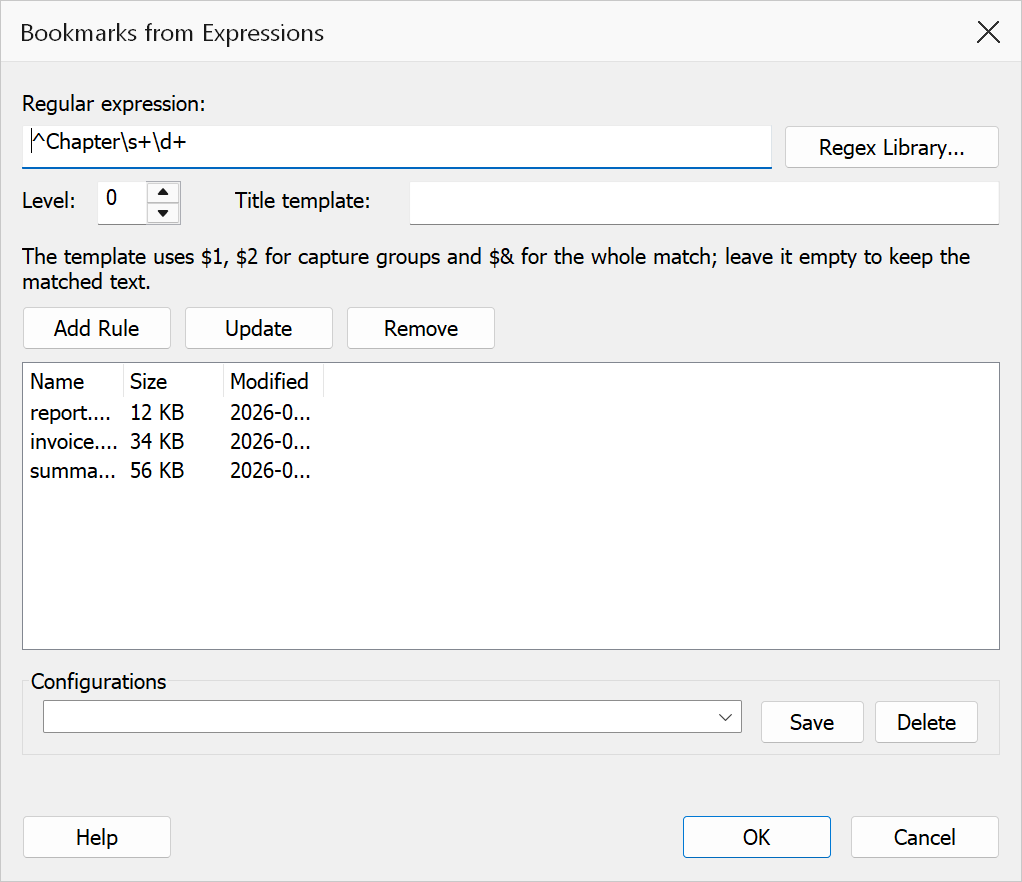
How to use
- Open the PDF you want to bookmark.
- Go to Plug-Ins > Bookmarks > Bookmarks from Expressions
(
Ctrl+Alt+X). - Type a pattern (or pick one via Regex Library), choose its Level, optionally give it a Title template, and click Add Rule.
- Repeat for further heading levels. Select a rule to edit it, then Update; Remove deletes it.
- Optionally save the rule set as a named configuration for reuse.
- Click OK. A summary reports how many bookmarks were created.
Note
Typing a single pattern and pressing OK without Add Rule still works — the fields run as a one-rule set, like the original version of this command.
Title templates
By default a bookmark's title is the matched text. A template rebuilds it from capture
groups, using the same convention as Search and Replace: $1, $2
insert groups, $& the whole match.
| Pattern | Template | Match | Bookmark title |
|---|---|---|---|
Invoice INV-(\d+) | Invoice $1 |
Invoice INV-0042 | Invoice 0042 |
(Chapter \d+): (.+?)\. | $2 ($1) |
Chapter 3: Results. | Results (Chapter 3) |
How pages are matched
- The words on a page are joined into a single line separated by spaces, so a heading
split across two lines still matches
Chapter\s+\d+; anchors such as^and$refer to the whole page, not visual lines. - Every match on a page produces a bookmark, and matches from all rules are ordered by their position in the text, which is what makes the levels nest correctly.
- Each bookmark points at the top of the page its match was found on.
- Titles longer than 60 characters are shortened with an ellipsis.
Warning
This engine does not support inline flags such as (?i) or look-behind
assertions; the dialog rejects such patterns when you add them. Use a character class
such as [Cc]hapter for case-insensitive matching.