Overview
Bookmarks From Table of Contents converts text that looks like a table of contents into PDF bookmarks. Each line of TOC text becomes a bookmark whose title is the text before the trailing page number, and whose destination is the corresponding page.
The TOC text comes either from a selection you make in the document or from a range of pages you nominate. Bookmarks can be created as one flat list, or nested into a hierarchy taken either from how far each entry is indented on the page or from the section number it starts with.
Every line is listed in the preview before anything is created, so you can see the hierarchy that was worked out and untick anything you do not want.
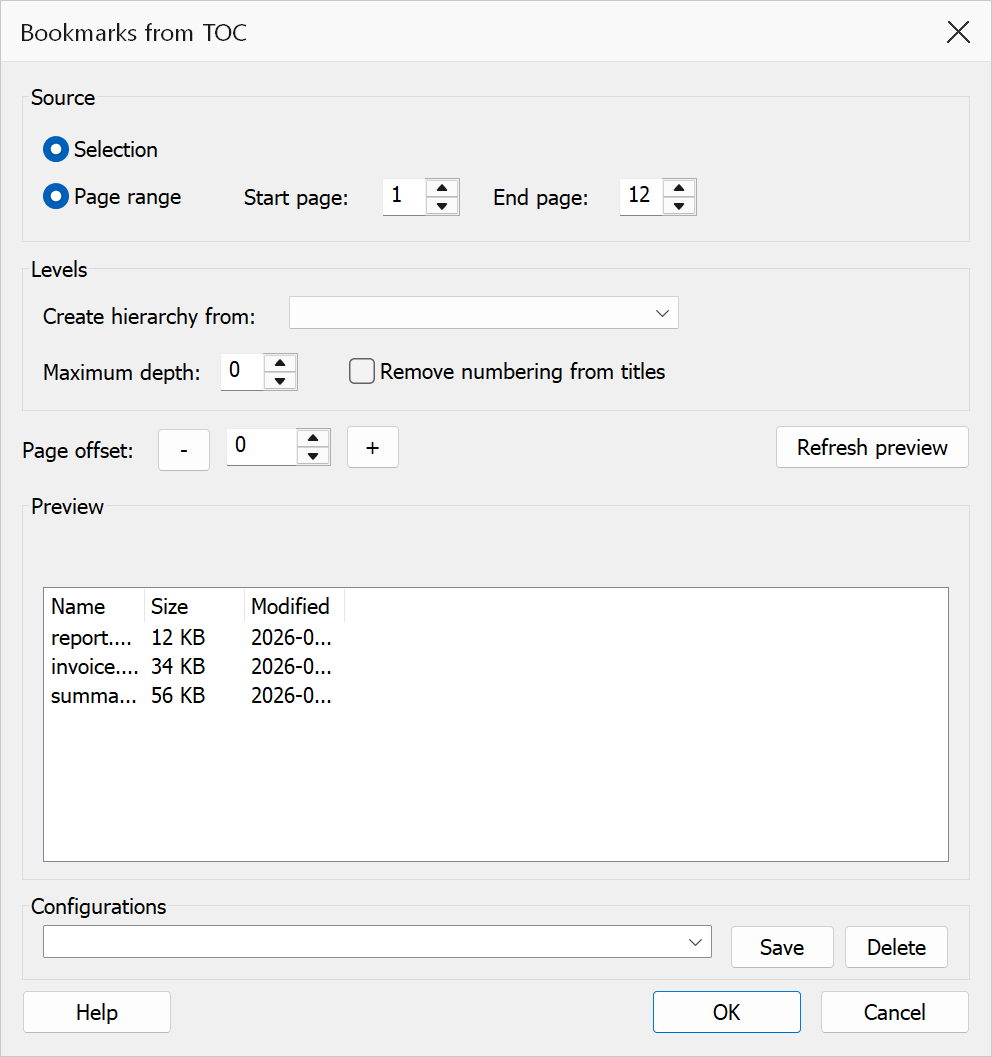
How to use
- Open the PDF that contains a table of contents.
- Optionally, select the contents entries with the text selection tool. This is only needed for Selection mode.
- Go to Plug-Ins > Bookmarks > Bookmarks From TOC.
- Choose the source: Selection, or Page range with the first and last page of the contents list.
- Leave Create hierarchy from set to Automatic unless you want to force a particular signal.
- Adjust the Page offset if the printed page numbers in the TOC do not match the actual PDF page numbers. The Goes to column shows where each bookmark will land.
- Check the preview and untick any line that should not become a bookmark.
- Click OK to generate the bookmarks.
Tip
Page range is the easier route for a contents list that runs over several pages, since a text selection in Acrobat only ever covers one page.
Options
| Option | Description |
|---|---|
| Selection | Uses the text currently selected in the document as the TOC source. Select the TOC lines with the text selection tool before opening the dialog. |
| Page range | Reads every line on the pages from Start page to End page inclusive. No selection is needed, and a contents list spanning several pages can be done in one go. Whole pages are read, so running heads and page numbers are picked up too — untick them in the preview. |
| Create hierarchy from | Which signal to read each entry's level from — see How levels are recognised below. Automatic uses the indentation when the contents page is laid out in columns and the section numbering otherwise. Indentation and Section numbering force one or the other. Do not create a hierarchy puts every bookmark at the top level. |
| Maximum depth | The deepest bookmark level to create (1–9). Entries numbered more deeply than this are placed at the maximum level instead of nesting further. |
| Remove numbering from titles | Leaves the section number out of the bookmark title, so 1.2 Scope is
bookmarked as Scope. The number is kept anyway when removing it would
leave the title empty. |
| Page offset | A positive or negative integer added to each page number parsed from the TOC text. Use the + and − buttons or type a value directly. This is useful when the TOC page numbers differ from the physical PDF page numbers (for example, when front matter uses Roman numerals). |
| Preview | Every bookmark that will be created, indented by level, with the page number read
from the entry and the PDF page it will open (Goes to, which
includes the page offset; (!) marks a destination outside the
document). Untick a line to leave it out. Refresh preview re-reads
the source text, which is worth doing after changing the page range. |
| Configurations | Type a name and click Save to store the current options, or pick a saved configuration from the list to load it. Delete removes the selected configuration. |
Expected TOC format
Each line should contain a title followed by a page number. Dot leaders between the title
and page number are stripped automatically, while ordinary full stops (as in
St. John) are left alone. The trailing digits at the end of each line are
treated as the destination page number.
How levels are recognised
Indentation
Most contents pages show their structure by indenting: chapters flush left, their sections a step in, sub-sections a step further. TOC Builder reads the position of each line on the page, groups the lines that start at the same place into indent columns, and turns each column into a bookmark level. Nothing has to be numbered for this to work.
Note
Indentation cannot be read from selected text on its own — PDF pages have no leading spaces or tabs, only positions — so TOC Builder re-reads the lines from the page to recover them. If the page has no extractable text (a scanned contents page, for instance) the Indentation option is not offered and Automatic falls back to section numbering.
Section numbering
Where entries are numbered, the level comes from the number of groups in the section number:
| TOC entry | Level |
|---|---|
1 Introduction | 1 |
1.2 Scope | 2 |
1.2.3 Definitions | 3 |
Chapter 4 Results | 1 |
Section 3.2 Tolerances | 2 |
IV. Discussion | 1 |
A.1 Test data | 2 |
Preface | 1 (no section number) |
Roman numerals and single letters are only read as section numbers when the line makes
that unambiguous — a following ., ) or :,
brackets around the number, or a heading word such as Chapter, Part or
Appendix. That is what keeps a title like A Brief History of Time
intact rather than reading its first word as a label.
Entries with no recognisable section number are created at the top level. An entry that jumps more than one level deeper than the entry above it — because its parent was missing from the selection — is placed at the next level down instead, so the bookmark tree never has a gap.
Tip
If bookmarks land on the wrong pages, adjust the Page offset value.
For example, if the TOC says page 1 but the actual content starts on PDF page 5, set
the offset to 4.
Note
New bookmarks are appended after any bookmarks the document already has; existing bookmarks are never merged or replaced. Lines that do not end with a numeric page number still become bookmarks, but without a destination attached.
Selection mode is one page at a time
A text selection in Acrobat covers a single page. For a contents list that runs over two or more pages, use Page range instead — or repeat the command once per page, since each run appends to the bookmarks already there.