Overview
Create Bookmarks From Links scans link annotations on selected pages and creates bookmarks that replicate each link’s destination. The bookmark title is extracted from the text underneath the link annotation. This is particularly useful for converting a linked table of contents into a bookmark tree.
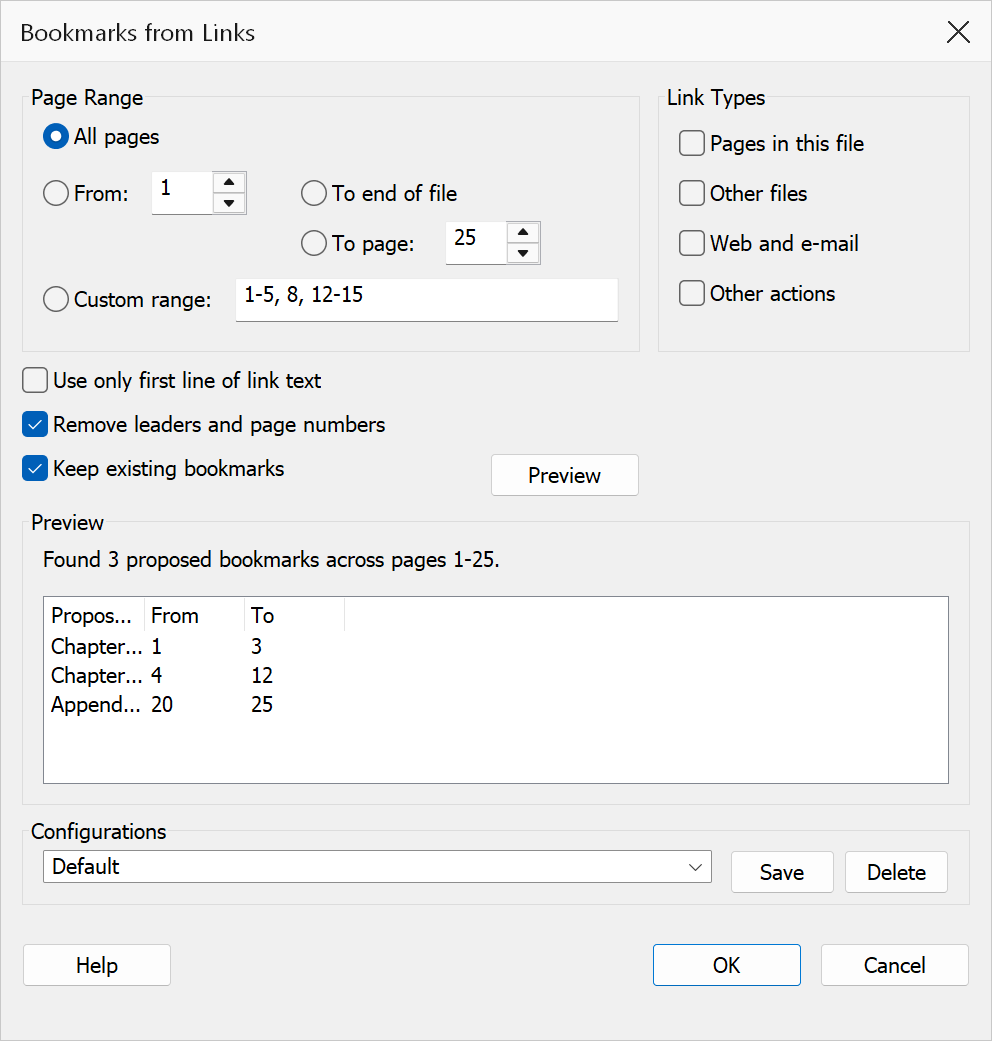
How to use
- Open a PDF that contains link annotations.
- Go to Plug-Ins > Bookmarks > Create Bookmarks From Links.
- Select a page range option and enter the start/end pages or a custom range.
- Configure title and bookmark options.
- Optionally click Preview to inspect proposed bookmarks before creating them.
- Click OK to generate the bookmarks.
Page range
| Option | Description |
|---|---|
| All pages | Processes every page in the document. |
| From | Processes a range that starts at the page you enter. Choose where the range ends with To end of file or To page. |
| To end of file | Processes from the start page through the last page of the document. |
| To page | Processes from the start page up to and including the specified end page. |
| Custom range | Enter a comma-separated list of pages and ranges, e.g. 1-3,7,10-12. |
Link types
A link does not have to point at a page in the current document, and each kind of link makes a different kind of bookmark. Use these check boxes to choose which links are turned into bookmarks; the bookmark receives a copy of the link’s own action, so it behaves exactly like the link it came from.
| Option | Description |
|---|---|
| Pages in this file | Links that jump to a page in the current document — GoTo actions
and link annotations with a plain Dest entry. On by default. |
| Other files | Links that open another document or an attachment — GoToR,
GoToE and Launch actions. On by default. |
| Web and e-mail | Links that open a web or mailto: address — URI
actions. On by default. |
| Other actions | Links that run anything else, such as JavaScript or a named viewer command. Off by default. |
Title options
| Option | Description |
|---|---|
| Only take first line from link | Uses only the first line of the link’s underlying text as the bookmark title. Useful when a link spans multiple lines but only the first line is meaningful. |
| Remove leaders and page numbers | Strips dot leaders (“......”) and trailing page numbers from the extracted link text, producing a clean bookmark title. |
Additional options
| Option | Description |
|---|---|
| Keep existing bookmarks | When checked, the current bookmark tree is preserved and new bookmarks are added. When unchecked, existing bookmarks are removed first. |
Preview
Click Preview to scan links in the selected page range without creating any bookmarks. Each row shows the proposed bookmark title, the source page the link sits on, the link’s Type (Page, File, Web or the action name), and its Target — the destination page number for a page link, or the file name or address for the others.
The summary line reports the total links scanned, how many bookmarks would be created, and how many were skipped. If the skipped count is high, check the Link Types boxes: the summary says how many links were excluded by those settings, and how many had no action or destination at all (those can never become a bookmark).
Tip
Enable both Only take first line and Remove leaders and page numbers when converting a typical table of contents with dotted leaders into bookmarks.
Note
A link annotation that has neither an action nor a Dest entry is always
skipped — there is nothing for the bookmark to point at. A page link whose named
destination cannot be resolved is still converted (the preview shows its target as
“unresolved”), because the copied action continues to work.
Warning
Clearing Keep existing bookmarks removes all current bookmarks before generating new ones. This cannot be undone.