Overview
Divide Pages into Smaller Pages geometrically subdivides each page in a PDF into multiple smaller tiles, producing a new document with more pages of smaller size. The page content itself is not re-rendered — the MediaBox of each tile page is set to the corresponding region of the original page, and the content stream is reused unchanged. PDF viewer clipping handles the rest.
Typical uses include splitting A3 double-page spreads into two A4 pages, or slicing a large-format drawing into printable A4 tiles.
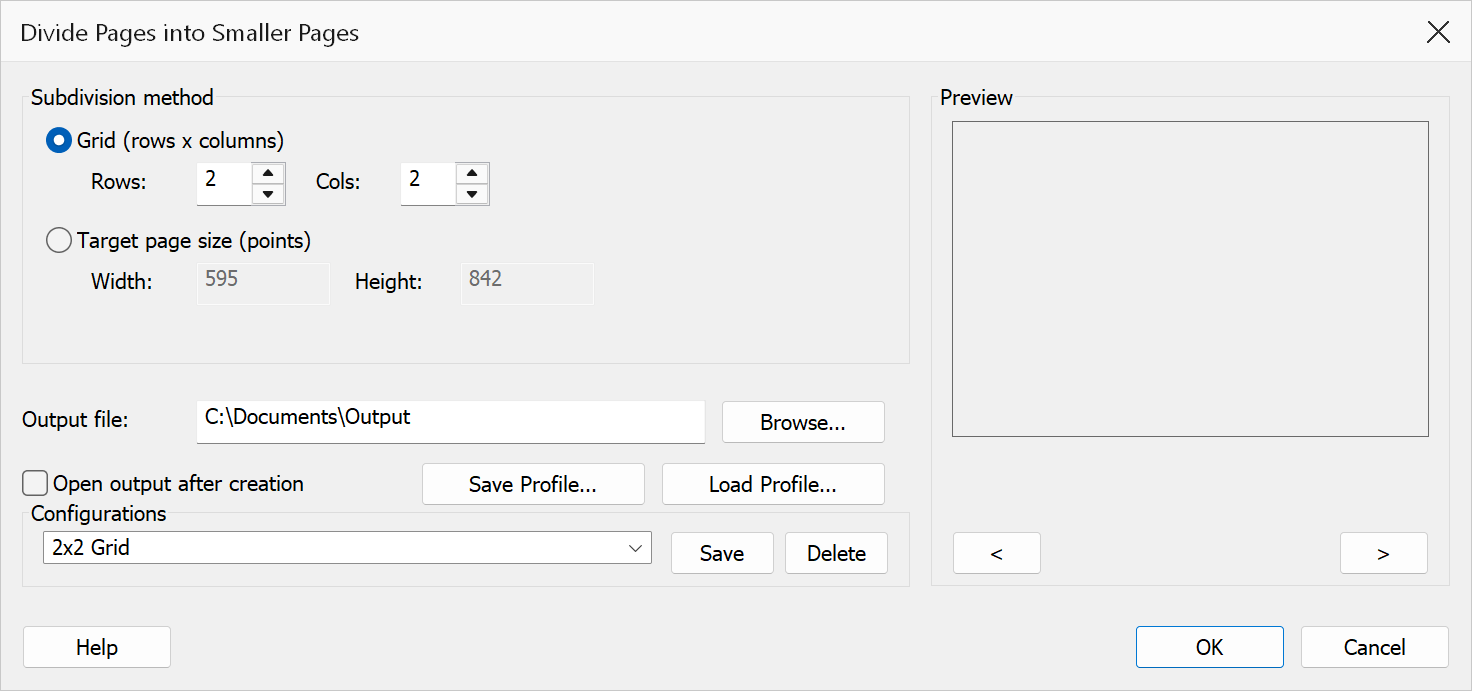
How to use
- Open the PDF whose pages you want to subdivide.
- Go to Plug-Ins > Split > Divide Pages into Smaller Pages.
- Choose a subdivision method: grid or target page size.
- Configure the method parameters (rows/columns or width/height).
- Choose an output file path and click OK.
Subdivision methods
| Method | Description |
|---|---|
| Grid (rows x columns) | Each source page is divided into a fixed grid. Enter the number of Rows and Columns. The grid fields are enabled when this radio button is selected (the default). Minimum value for each is 1. |
| Target page size | Specify the desired output tile Width and Height in PDF points (72 pt = 1 inch). The tool calculates how many columns and rows are needed to cover the source page and creates that grid. The size fields are enabled when this radio button is selected. |
Grid mode examples:
| Rows | Cols | Effect |
|---|---|---|
| 1 | 2 | Splits page left/right (e.g. A3 into two A4) |
| 2 | 1 | Splits page top/bottom |
| 2 | 2 | Four equal quadrants |
| 3 | 4 | 12-tile grid (e.g. for a large map) |
Common target page sizes:
| Paper size | Width (pt) | Height (pt) |
|---|---|---|
| A4 portrait | 595 | 842 |
| A4 landscape | 842 | 595 |
| A3 portrait | 842 | 1191 |
| Letter portrait | 612 | 792 |
Output options
| Option | Description |
|---|---|
| Output file | The path of the new PDF to create. Click Browse to choose a save location and filename. The source document is not modified. |
| Open output after creation | Opens the generated file in Acrobat after the operation completes. |
Warning
The content stream of each tile page is the same as the source page — the PDF viewer clips to the tile's MediaBox. Vector content and text that falls outside the tile are clipped but remain in the file, which may increase file size for documents with many tiles.
Tip
To split an A3 landscape spread into two A4 portrait pages, use Grid mode with 1 row and 2 columns. Default grid values are 2 rows and 2 columns; default target size values are 595 x 842 (A4 portrait).
Note
Tiles are ordered left-to-right, top-to-bottom (row-major order). CropBox, BleedBox, TrimBox, and ArtBox are removed from tile pages so the MediaBox governs the visible area. Tiles at the right or bottom edge may be smaller than the target size if the source page does not divide evenly. Page rotation is preserved per tile.
Preview
The Preview pane shows a real page from the open document with the current settings drawn on it, so the result can be checked before clicking OK.
The pane is not restricted to the first page. Step through the document with the < and > buttons beneath it, or roll the mouse wheel with the pointer over the pane; the caption below reads Page n of N. Pages in one document can differ in size, orientation and content, so it is worth checking several of them before applying a change to the whole file.