Overview
Extract Pages by Annotations collects the pages that carry the kinds of annotation you choose — highlights, comments, stamps, drawings and more — and puts them in a new PDF. It is the quick way to pull just the reviewed or marked-up pages out of a long document.
The open document is not changed, and no annotations are removed.
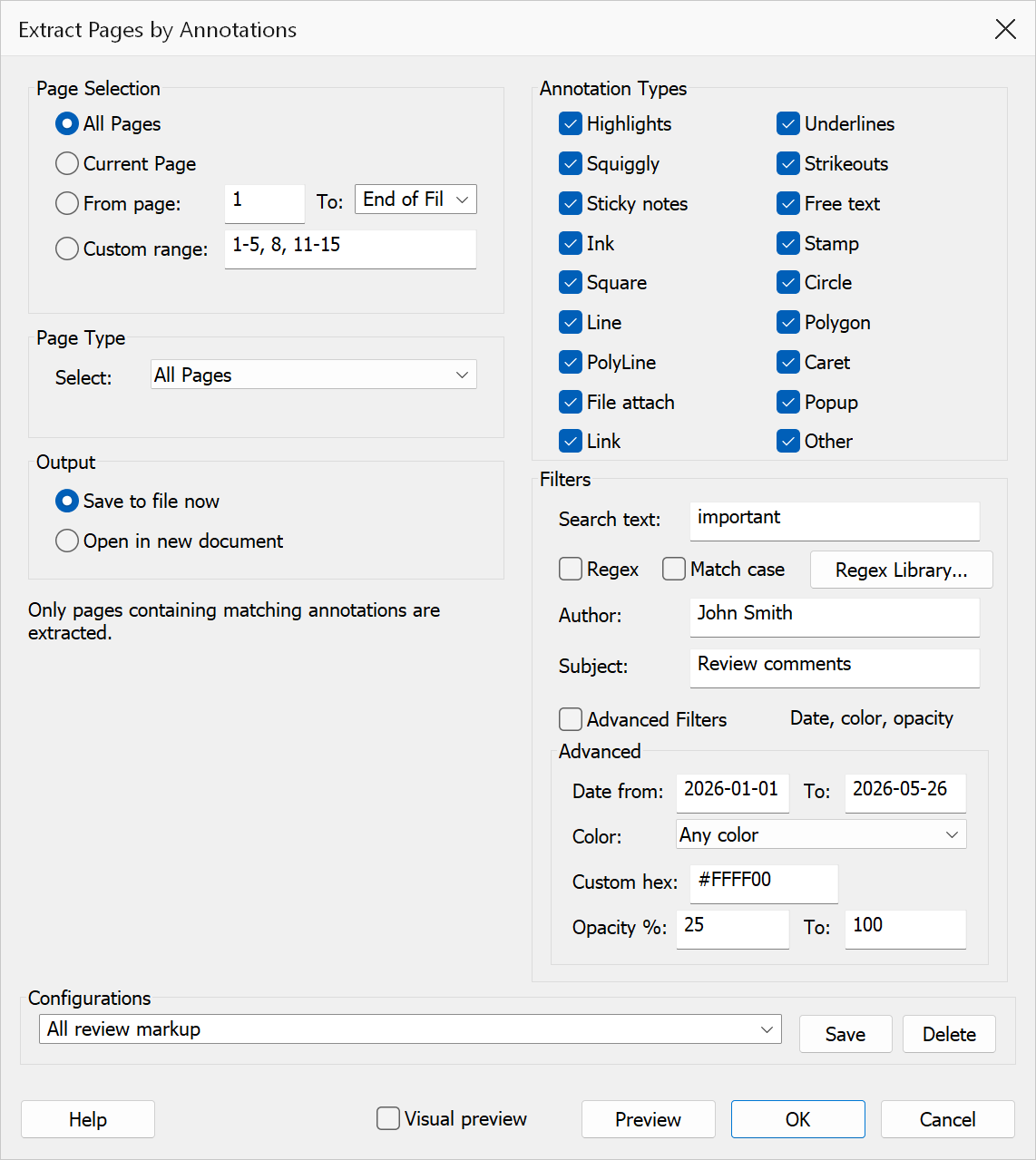
How to use
- Open the annotated PDF.
- Go to Plug-Ins > Pages > Extract Pages by Annotations.
- Choose which pages to search — all pages, a range, or only even or odd pages.
- Tick the annotation types that should count. A page is extracted if it carries at least one annotation of any ticked type.
- Choose whether the result opens as a new untitled document or is saved to a file.
- If saving, pick a name and location in the Save dialog and click Save.
Annotation types
Text markup (highlight, underline, squiggly, strike-out), notes and free text, ink drawings, stamps, shapes (square, circle, line, polygon, polyline), carets, file attachments, popups and links can each be included or excluded, and there is an Other option for any type not listed.
If no page carries a matching annotation the command says so and stops, rather than producing an empty document.
Note
Choosing to open the result as a new document leaves it unsaved — save it yourself when you are happy with it.