Overview
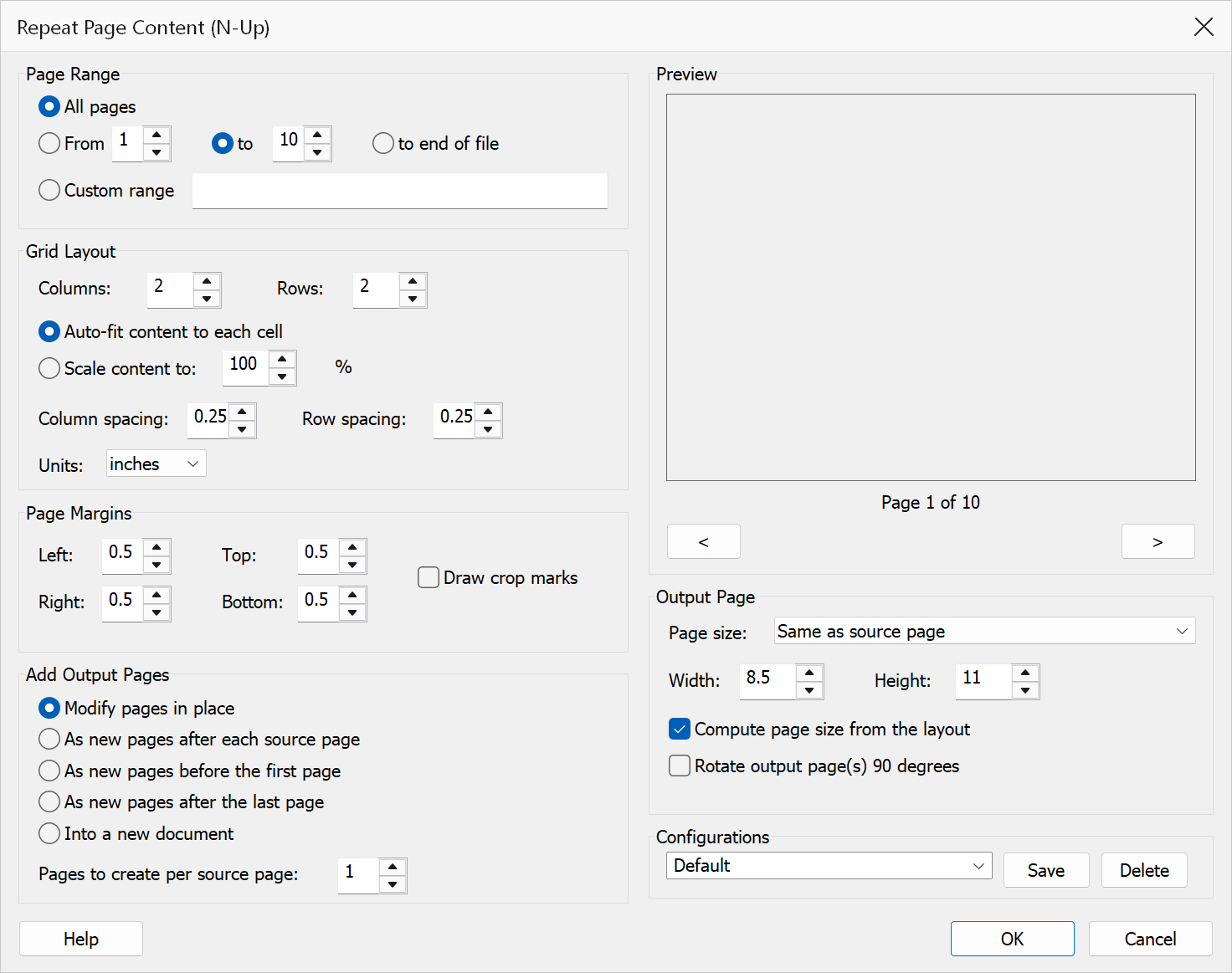
Repeat Page Content (N-Up) repeats the content of each selected page in a grid of columns and rows — uniformly scaled, never stretched — either onto the page itself or onto newly created pages. This is commonly used for printing multiple copies of business cards, labels, tickets, or other small items on a single sheet.
The repeated copies reference the source page's content rather than duplicating it, so the file does not grow significantly however many repetitions are made.
How to use
- Open a PDF document in Acrobat.
- Go to Plug-Ins > Pages > Repeat Page Content (N-Up).
- Select the page range to repeat.
- Enter the number of columns and rows for the grid, and choose the scaling, spacing and margins.
- Choose where the output goes: onto the pages themselves, onto new pages, or into a new document.
- Check the Preview, then click OK.
Options
Grid layout
| Option | Description |
|---|---|
| Page range | The pages whose content is repeated. Choose All pages, a
From / To range, or a Custom range such as
1-3,7,9-. Each selected page is processed independently. |
| Columns / Rows | The grid dimensions, 1–10 each. The content is repeated columns × rows times per output page. |
| Auto-fit content to each cell | Scales the content to the largest size that fits its grid cell while keeping its proportions. The default, and what saved configurations from earlier versions use. |
| Scale content to % | Scales the content to a fixed percentage (1–1000) of its original size instead. At 100 the copies are full size, which usually calls for a larger output page or Compute page size from the layout. |
| Column / Row spacing | Space between adjacent columns and rows, in the selected units. |
| Units | Unit (pt, in or cm) for the spacing, margins
and custom page size. Changing it converts the values already entered. |
Page margins
| Option | Description |
|---|---|
| Left / Top / Right / Bottom | Margins kept clear around the grid on the output page. |
| Draw crop marks | Strokes thin cutting guides just outside the corners of every placed copy — useful when the sheet will be cut into cards or labels. Available once a margin or spacing gives them room to be drawn. |
Output
| Option | Description |
|---|---|
| Modify pages in place | Tiles each selected page's content onto that same page. The page's size does not change. This is what earlier versions always did. |
| As new pages… | Leaves the source pages alone and creates the tiled result as new pages — after each source page, before the first page, or after the last page. |
| Into a new document | Creates the tiled result in a new PDF, opened in Acrobat. The document is untitled and unsaved — use File > Save As to keep it. |
| Pages to create per source page | How many identical output pages to create for each source page (1–99), when new pages are being created. |
| Page size | Size of the created pages: the source page's own size, a standard size (Letter, A4, Legal, A3, A5, Tabloid), or Custom width and height. |
| Compute page size from the layout | Sizes the created pages to exactly hold the grid at the chosen scale, spacing and margins. Requires a scale percentage (auto-fit to a page whose size follows the fit would be circular). |
| Rotate output page(s) 90 degrees | Turns the created pages a quarter turn (portrait ↔ landscape). The repeated content keeps its own orientation. |
Tip
For business cards, design one card at full size (3.5 × 2 inches), then repeat it 2 columns × 5 rows at 100% with 0.1 inch spacing and 0.5 inch margins, with Compute page size from the layout checked — or auto-fit onto a Letter or A4 page. Enable crop marks to guide the cutter.
Note
The content is always scaled uniformly — proportions are preserved and copies are centered in their cells. Pages with a rotation or an offset visible area are handled as displayed: what you see on screen is what gets repeated.
Caution
The operation cannot be undone with Edit > Undo — close the document without saving to discard it. When modifying pages in place, links, form fields and comments are left where they were: they are not scaled or repeated with the content. Newly created pages carry no annotations.
Preview
The Preview pane shows a real page from the open document laid out with the current settings — grid, scale, spacing, margins, crop marks and output page size — so the result can be checked before clicking OK.
The pane is not restricted to the first page. Step through the document with the < and > buttons beneath it, or roll the mouse wheel with the pointer over the pane; the caption below reads Page n of N. Pages in one document can differ in size, orientation and content, so it is worth checking several of them before applying a change to the whole file.
Configurations and automation
Settings can be saved as named configurations with the Save button and recalled from the drop-down. Saved configurations also make the command available in Acrobat's Action Wizard as Repeat Page Content (N-Up), and to batch processing. Configurations saved by earlier versions still load; they run as “modify pages in place” with auto-fit scaling.