Overview
Split by File Size divides the current PDF into multiple output files, each staying under a specified maximum file size. This is useful when you need to send PDF files via email or upload them to systems with file size limits.
The plug-in uses a binary search approach to find the optimal number of pages per chunk that keeps each output file within the target size. Since page sizes vary (some pages may contain large images while others are text-only), the actual number of pages in each output file may differ.
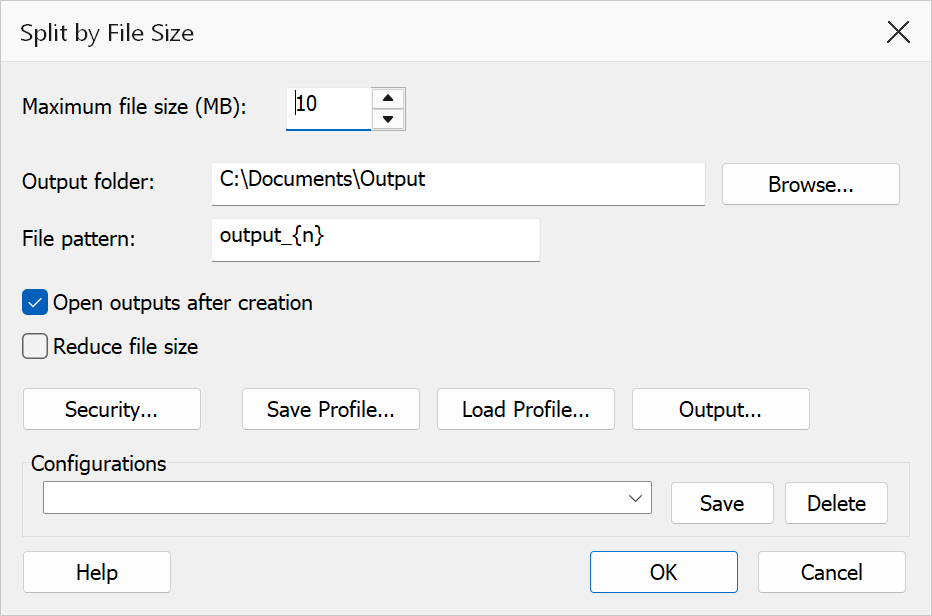
How to use
- Open the PDF you want to split.
- Go to Plug-Ins > Split > Split by File Size.
- Enter the maximum file size in megabytes (e.g. 10 for a 10 MB limit).
- Set the output folder and file pattern, then click OK.
Options
| Option | Description |
|---|---|
| Maximum file size (MB) | The target maximum size for each output file in megabytes. Must be at least 1 MB. The actual output size may be slightly less than this value. |
| Output folder | The folder where output files are saved. Click Browse to choose a folder. |
| File pattern | Controls the output filename. Use {n} for the 1-based file index
(zero-padded to 3 digits). Default is output_{n}. |
| Open outputs after creation | Opens each generated file in Acrobat after the operation completes. |
| Reduce file size | Applies garbage collection and linearization to output files, resulting in smaller file sizes. Useful when the source PDF contains unused objects. |
| Security... | Opens the Output Security Settings dialog to apply password protection and permission restrictions to the output files. |
| Save Profile / Load Profile | Save the current dialog settings as a .tsp profile file, or load
a previously saved profile. Profiles can be used for command-line automation. |
Tip
For email attachments, a common limit is 10 MB or 25 MB. Set the maximum size slightly below the limit (e.g. 9 MB for a 10 MB email limit) to account for email encoding overhead.
Note
If a single page exceeds the maximum file size, it will be placed in its own output file regardless of the size limit. The plug-in cannot split individual pages.