Overview
Split by Orientation Change splits a PDF document at every point where the page orientation changes between portrait and landscape (or vice versa). This is useful when a document contains a mix of portrait and landscape pages and you need to separate them into distinct files.
Alternatively, you can use Group by Orientation mode to collect all portrait pages into one file and all landscape pages into another, regardless of their original order in the document.
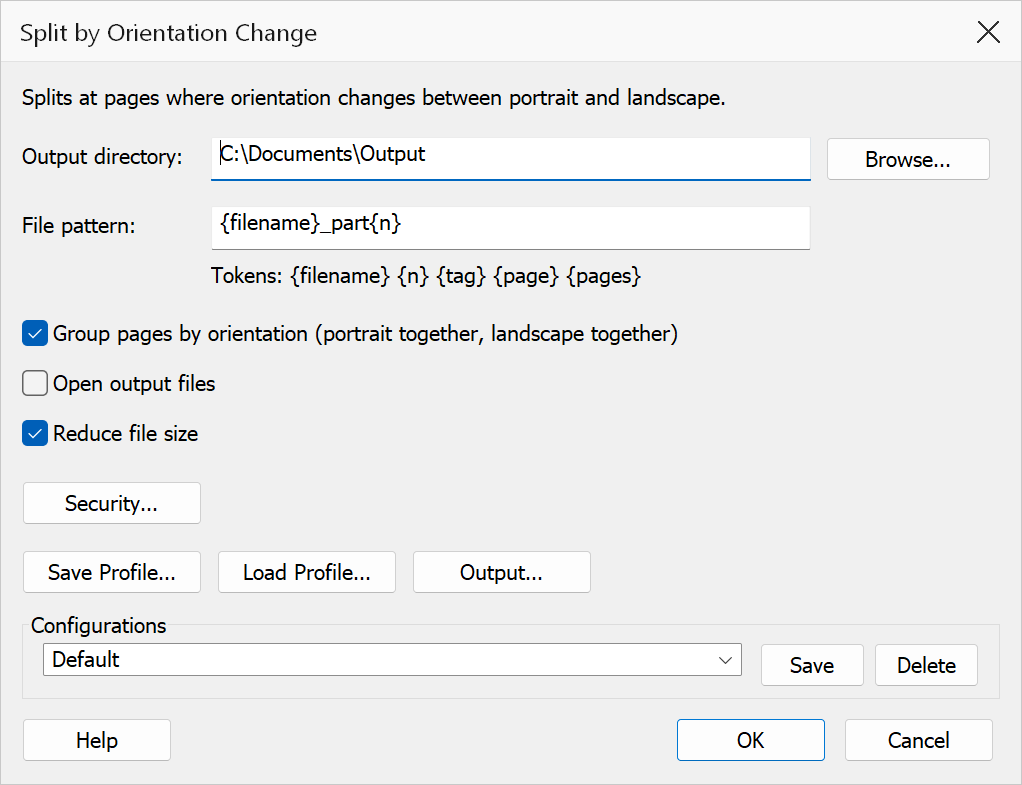
How to use
- Open the PDF document you want to split.
- Go to Plug-Ins > Split > Split by Orientation Change.
- Set the Output directory where split files will be saved.
- Configure the File name pattern using the available tokens.
- Optionally enable Group by Orientation to collect all pages of the same orientation together.
- Configure any additional options such as security or file size reduction.
- Click OK to perform the split.
Options
| Option | Description |
|---|---|
| Output directory | The folder where the split output files will be saved. Click Browse to select a folder. |
| File name pattern | The naming pattern for output files. Use tokens such as {original} for the
source file name, {n} for the split number, and {orientation}
for the page orientation (Portrait or Landscape). |
| Group by Orientation | When enabled, all portrait pages are collected into one output file and all landscape pages into another, instead of splitting at each orientation change. |
| Open output files | When enabled, each output file is opened in Acrobat after splitting. |
| Reduce file size | Runs Acrobat's Reduce File Size on each output file to minimize the file size. |
| Security | Applies password security or other restrictions to the output files. Click Security... to configure. |
Tip
Use the {orientation} token in the file name pattern to easily identify
which output files contain portrait pages and which contain landscape pages.
Note
A page is considered landscape when its width is greater than its height, and portrait when its height is greater than or equal to its width. Rotated pages are evaluated using their effective dimensions after rotation.