
PdfHub Local: The Desktop Edition of Mapsoft PDF Hub
35+ PDF tools, running natively on your own machine — offline, private, and fast.
Quick summary
Quick answer: PdfHub Local is the desktop version of Mapsoft PDF Hub. It runs 35+ of the Hub’s PDF tools on your own Windows machine instead of in a browser, so your files never leave your computer, there are no upload limits, and it works offline. It is free to try for 14 days and is then included with any paid PDF Hub plan. Download it here.
Mapsoft PDF Hub has always been a browser-based suite: open a tool, upload a file, get the result back — nothing to install. That is exactly what you want for a quick one-off job. But plenty of work doesn’t fit that shape: confidential documents that shouldn’t be uploaded anywhere, folders of hundreds of files to process in one pass, or simply working somewhere with no reliable connection. PdfHub Local is built for those jobs.
What is PdfHub Local?
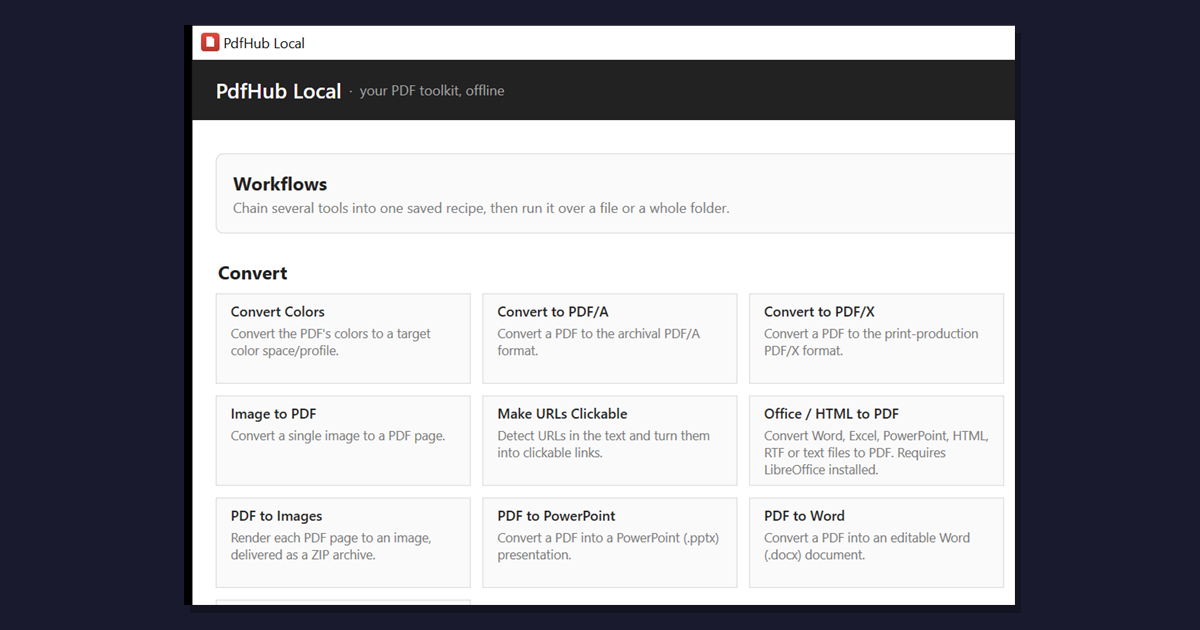
PdfHub Local is a native Windows desktop application that packages 35+ of the PDF Hub tools into an app that runs on your own machine. It is built on the same engine as the online Hub — the Adobe PDF Library (Datalogics APDFL) — so the output is identical to what you get online. The difference is where the work happens: everything is processed locally, on your computer, with no file ever uploaded to a server.
Online Hub or desktop app — which should you use?
They share the same core tools, so the choice comes down to the job in front of you:
- Reach for the online Hub when you want zero install, you’re on someone else’s machine, or it’s a quick one-off — merge two files, compress an attachment, convert a single document.
- Reach for PdfHub Local when the documents are confidential, when you’re processing many files at once, when there are no file-size limits to worry about, or when you need to work offline.
Your subscription covers both, so you can move between them freely.
Why run PDFs locally?
- Privacy. Files are read and written on your own disk and never uploaded. For legal, medical, financial or otherwise sensitive documents, that is often a hard requirement rather than a nicety.
- No upload, no limits. Without a round-trip to a server there’s no per-file size cap and no waiting on your connection — large scans and image-heavy files process at local-disk speed.
- Batch a whole folder. Point the app at a folder and apply the same operation — compress, watermark, convert, OCR — to every file in one pass, instead of repeating an upload-download cycle by hand.
- Works offline. Once activated, the app verifies your license locally, so it keeps working on a plane, behind an air gap, or anywhere the network is unreliable.
- Repeatable workflows. Chain several operations into a saved workflow — for example “watermark, then compress, then convert to PDF/A” — and re-run it whenever you need it.
What’s in the box
PdfHub Local carries 35+ of the PDF Hub tools. The headline capabilities:
- Convert. To and from Word, Excel, PowerPoint and images; convert to PDF/A for archiving or PDF/X for print.
- Organize. Merge, split, extract, rotate, reorder and delete pages — with a visual Page Manager and an in-app preview so you can see what you’re doing.
- Optimize. Compress files, linearise for fast web view, and repair damaged documents.
- Secure. Password-protect, unlock, redact sensitive information, and sanitise hidden data.
- Sign. Apply digital signatures, including signatures you draw directly in the app.
- OCR. Make scanned documents searchable, with offline OCR language data bundled in the installer — no separate download.
- Batch & workflows. Run any of the above across a folder of files, or chain operations into reusable multi-step workflows.
How licensing works
PdfHub Local is tied to the same subscription you already use on the website — there is no separate product to buy:
- 14-day trial. Download and use every tool free for two weeks. No account or payment needed to start.
- Included with paid plans. Any paid PDF Hub plan (Super User or Developer) includes the desktop app at no extra cost.
- Activate with a key. Your license key lives on your account page. Paste it into Activate in the app and you’re unlocked.
- Up to three devices. Use it on a few machines per subscription, and manage or deactivate devices from your account page.
- Offline-friendly. After activation it verifies your license locally and keeps working between renewals, re-checking your subscription when it next connects.
Getting started
- Download and install. Grab the installer from the PdfHub Local page and run it — it sets up everything, including offline OCR.
- Use the trial. Open the app and start working; every tool is unlocked for 14 days.
- Activate. When you’re ready, copy your license key from your account page, paste it into Activate, and the trial banner disappears.
That’s it — the same PDF tools you know from the online Hub, now running privately on your own machine.
Frequently Asked Questions
Is PdfHub Local free?
It’s free to try for 14 days with every tool unlocked — no account or payment needed to start. After the trial it’s included with any paid PDF Hub plan (Super User or Developer): you activate it with a license key from your account page, at no extra cost.
Does PdfHub Local work offline?
Yes. All processing happens locally on your machine — your files are never uploaded. Once activated, the app verifies your license offline and keeps working without a connection, checking in periodically to confirm your subscription is still active.
How is it different from the online PDF Hub?
The same core tools and PDF engine — but PdfHub Local runs on your desktop instead of in a browser. Files never leave your computer, there’s no upload or file-size limit, batch processing of whole folders is faster, and it works offline. The online Hub stays the zero-install option for quick one-off jobs.
What do I need to run it?
A 64-bit Windows PC. The installer is self-contained — it includes everything the app needs, including offline OCR language data — so there are no separate runtimes to install.
How many devices can I use?
Up to three devices per subscription by default. You can see and manage your activated devices on your account page, and deactivate one to free a seat for another machine.
Related Articles
Adobe Acrobat Alternatives
Where a full Acrobat license is more than you need — the online and desktop options that cover the everyday PDF jobs.
Batch Processing in Acrobat
How Acrobat’s Action Wizard automates repetitive PDF tasks — and how folder-based batch processing compares.
Acrobat vs Free PDF Editors
What you give up — and what you don’t — when you step away from Acrobat for routine PDF work.
Try PdfHub Local
Free for 14 days — every tool unlocked, nothing leaves your machine.