Overview
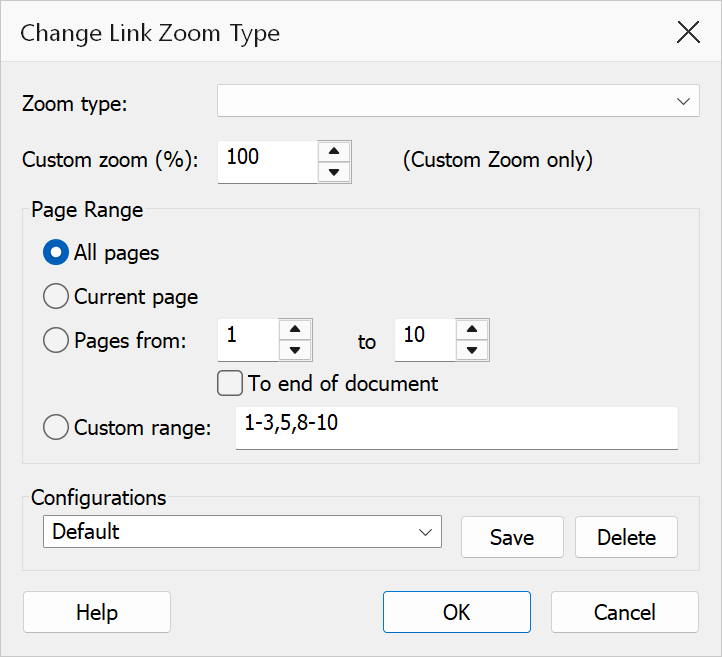
Change Link Zoom Type updates the zoom/view destination for link annotations in the active PDF. This controls how the view changes when a reader clicks a link that navigates to another page in the same or a different document. You can apply the change to all pages, the current page, a page range, or a custom range expression.
How to use
- Open a PDF that contains link annotations with page destinations.
- Go to .
- Select a zoom type from the dropdown.
- If you choose Custom Zoom, enter a zoom percentage (1–1000%).
- Choose the page scope: All pages, Current page, a page range, or a custom range expression.
- Click OK to apply the new zoom type to all matching links.
Zoom types
| Zoom type | Description |
|---|---|
| Fit Page | Fits the entire destination page within the viewer window. |
| Fit Width | Fits the page width to the viewer window, allowing vertical scrolling. |
| Fit Visible | Fits the visible content area (bounding box) to the viewer window width. |
| Inherit Zoom | Keeps the current zoom level unchanged when the link is clicked. |
| Actual Size | Displays the destination page at 100% zoom. |
| Custom View | Sets each link to a Fit Rectangle destination using the page bounds. |
| Custom Zoom | Sets a specific zoom percentage. Enter a value between 1 and 1000 in the adjacent field. |
Page range
| Option | Description |
|---|---|
| All pages | Applies the zoom change to links on every page in the document. |
| Current page | Applies the change only to links on the page currently displayed. The option label shows which page that is, and how many pages the document has. |
| Pages from ... to ... | Applies the change to links in one block of consecutive pages. Both page numbers are included in the range and both are 1‑based, so page 1 is the first page of the document. |
| To end of document | Available when Pages from is selected. Ignores the end page and continues from the start page through to the last page of the document. |
| Custom range | Enter a custom page range expression (e.g., 1-5, 8, 12-20). Only digits,
commas, and hyphens are allowed. |
Page numbers must be between 1 and the number of pages in the document; the dialog reports any value that falls outside that range when you choose OK.
Tip
Setting links to Inherit Zoom provides the smoothest navigation experience, as readers stay at their preferred zoom level when clicking links.
Note
Only links with GoTo page destinations are affected. Web links (URI actions), JavaScript actions, and other non-page-navigation links are not modified.