
Download TOCBuilder
Get started with Mapsoft TOCBuilder — the Adobe Acrobat plugin for generating professional tables of contents in PDF documents.
Important Notes
Acrobat Required
This plugin requires the full version of Adobe Acrobat (Standard or Pro). It will not run under the free Adobe Reader.
Get Adobe Acrobat →Acrobat DC (32-bit & 64-bit)
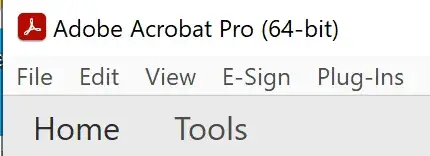
There are now two versions of Acrobat DC: 32-bit and 64-bit, identified on the Acrobat title bar. The installer will detect and install the correct version automatically.
Trial Mode
To try the software, enter the word Demo as the serial number during installation. This is not case-sensitive. The plugin will run in tryout mode.
Digitally Signed
All Mapsoft installers are digitally signed by Mapsoft Computer Services Limited for your security. Learn more →
System Requirements
Requires Adobe Acrobat DC, 2020, or 2017 (Standard or Pro) on Windows 10 or 11. See full requirements on the product page.
Getting Started
Please read the following instructions to help you get started using TOCBuilder.
Installation
Please make sure that you have the full version of Acrobat running, or at least a demo version. This plug-in will not run under the free Adobe Reader. The plug-in becomes part of Adobe Acrobat, so once the software is installed you will need to open Adobe Acrobat to use it.
To install the software:
- Step 1: Extract the installer from the zip file that you have downloaded. In Windows you probably won't have to extract the installer as the zip file will open just like a folder.
- Step 2: Run the
Mapsoft_TOCBuilder_Install.exefile by double clicking on it. On some systems that are more restricted you may need to run the installer as Administrator (right-click and select "Run as administrator" from the context menu). Do not change the user to an Administrator account to complete the installation. - Step 3: Run through the screens, agreeing to the license agreement and entering your serial number. If you don't have a serial number and just want to use the demo version, type the word
Demointo the serial number field.
Silent Installation
The installer supports silent mode for automated or scripted deployments. Use the /VERYSILENT flag along with the /Serial parameter to provide the serial number:
Mapsoft_TOCBuilder_Install.exe /VERYSILENT /Serial=YOUR_SERIAL_NUMBER
To install in tryout mode, use /Serial=Demo.
Using the Software
Once the plug-in is installed and you load Acrobat, you will find TOCBuilder on the Plug-ins > Mapsoft menu.
For further information please see the User Guide.
Running TOCBuilder Under the Latest Versions of Adobe Acrobat
You may encounter problems saving configurations in TOCBuilder when running under the latest versions of Acrobat DC (both 32-bit and 64-bit). Acrobat is often installed with protected mode on, which stops access to external files and the registry.
This can be switched off in the Edit > Preferences menu and then by going to the Security (Enhanced) tab. Uncheck the protected mode option to allow TOCBuilder to save configurations correctly.
Resources
Everything you need to get the most out of TOCBuilder.
User Guide
Complete documentation covering all TOCBuilder features and configuration options.
Ready to Purchase?
Contact us for licensing options or visit the store to buy TOCBuilder.