
Mapsoft Releases 64-bit Windows Versions
TOCBuilder embraces the future with 64-bit support, in sync with Adobe Acrobat's transition.
With the release of Adobe Acrobat DC and Adobe Acrobat 2020 as 64-bit versions, Mapsoft has released a 64-bit Windows version of its plugin, TOCBuilder. The installer is now able to determine if the installed version of Acrobat is 32 or 64 bit and install the appropriate version.
Adobe is no longer supporting 32-bit operating systems - https://helpx.adobe.com/uk/acrobat/kb/end-of-support-acrobat-reader-32-bit-os.html. This does not mean that the 32-bit executable of Adobe Acrobat is not supported on 64-bit Windows. However updates of Acrobat in the future will start to update to 64-bit and it is for this reason that we decided to produce a 64-bit version of TOCBuilder.
See more details of TOCBuilder on our website.
Why 64-bit Matters for PDF Processing
The difference between 32-bit and 64-bit software is fundamentally about memory. A 32-bit process can address a maximum of 4 gigabytes of virtual memory, and in practice on Windows the usable limit is typically 2 GB per application — sometimes 3 GB with Large Address Aware flags set. For most desktop applications, this is plenty. For intensive PDF processing, it is not.
PDF documents used in professional publishing, legal, engineering, and pharmaceutical workflows can be extremely large. A technical manual with hundreds of high-resolution images embedded, or a legal bundle with thousands of pages, can exhaust the memory available to a 32-bit process during complex operations. TOCBuilder, for instance, needs to hold the document structure in memory while building and manipulating bookmarks, cross-references, and tables of contents across the entire document. On very large files, 32-bit processes would either slow down dramatically as they hit memory pressure or crash outright. The 64-bit version eliminates that ceiling entirely — the process can address as much memory as the system has available, which on a modern workstation is typically 16 GB or more.
There is also a secondary benefit: 64-bit processes can take advantage of modern processor features more effectively. The x86-64 instruction set doubles the number of general-purpose registers available compared to x86-32, which means the compiler can generate faster code for computation-heavy operations. For operations like scanning page content, building index structures, or processing large numbers of annotations, this makes a measurable difference.
The Technical Challenge of Porting a Plugin to 64-bit
Moving an Acrobat plug-in from 32-bit to 64-bit is not as simple as ticking a different compiler option, though that is where it starts. Acrobat plug-ins are native code libraries — DLLs on Windows — built against Adobe's Acrobat SDK. The SDK itself needed to be updated by Adobe to provide 64-bit headers and libraries, which happened with Acrobat DC. Once those were available, the porting work could begin.
The most common source of issues when porting 32-bit code to 64-bit is pointer size assumptions. In 32-bit code, it is easy to fall into the habit of treating pointers as 32-bit integers because they happen to be the same size. In 64-bit code, pointers are 8 bytes, not 4, and code that casts between pointer types and integer types carelessly will produce subtle bugs — or simply fail to compile if you have the right warnings enabled. Mapsoft had to audit the codebase carefully for these patterns, along with any code that used fixed-size integer types where the actual size of a native integer had been assumed.
Third-party libraries used by the plug-ins also needed 64-bit versions. Any library that only provided a 32-bit build becomes a blocker — a 64-bit process cannot load a 32-bit DLL. In most cases, the libraries we depended on had 64-bit builds available; in a small number of cases, we needed to either build them from source ourselves or find equivalent alternatives.
Testing is the other major cost of a 64-bit port. The plug-in needs to function correctly against every supported Acrobat version, both 32-bit and 64-bit, across the range of Windows versions that customers use. We test against current and recent Acrobat releases as part of every product update, but a major architecture change like this required more extensive validation — running through the full feature set of each plug-in on representative documents and verifying that outputs matched what the 32-bit version produced.
How do I know if I have a 32 or 64 bit version of Adobe Acrobat installed?
Adobe have been good enough to output this information on the title bar of Acrobat when it runs.
What else has changed in Acrobat?
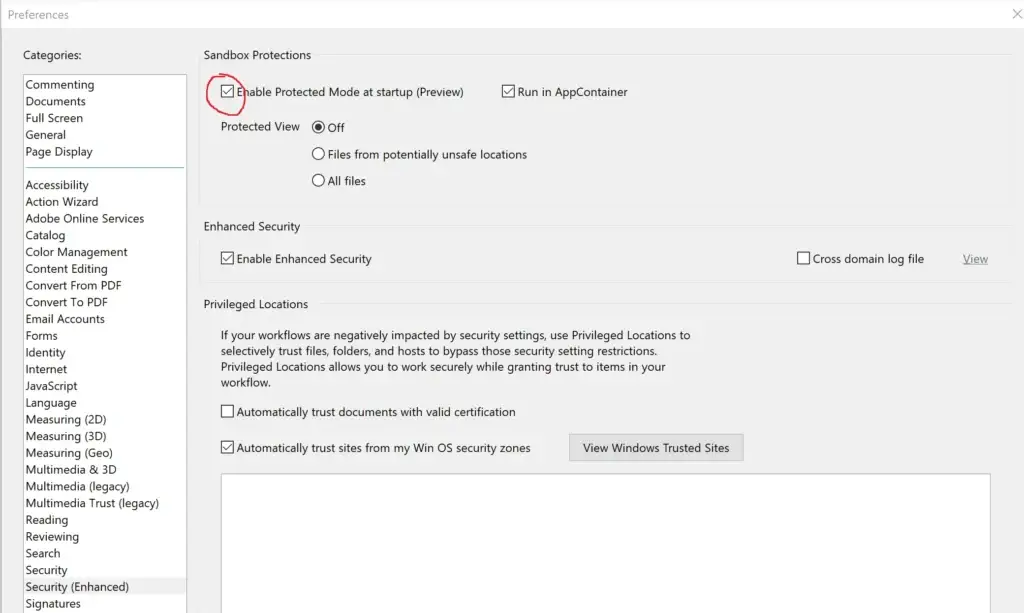
Enhanced Security which unfortunately can disable some functionality in the product such as saving to files other than the current PDF such as preference information.
Acrobat is often installed with protected mode on which is stopping access to external files and the registry. This can be switched off in the Edit/Preferences menu and then by going to the Security (Enhanced) tab.
How to buy Mapsoft TOCBuilder?
Licensing is available for the first time as an annual subscription which will ensure that we can keep updating the plug-in into the future and remaining compatible with later versions of Adobe Acrobat and the new PDF version 2 standard.
For the moment we are also going to continue perpetual licenses but these will only be valid for the current version of the product. The product is available for purchase at our store.
What Users Gain from the 64-bit Version
For most users working with typical documents, the difference between 32-bit and 64-bit TOCBuilder will not be dramatic day-to-day — the core functionality is identical. Where the 64-bit version makes a noticeable difference is on larger documents and in batch processing scenarios. If you are running TOCBuilder on a folder of large PDFs in a watch-folder automation, the 64-bit version will handle that workload with less memory pressure and greater stability. If you are working on a document with thousands of bookmarks or processing PDFs that are hundreds of pages long with embedded high-resolution graphics, the 64-bit version removes limits that could previously cause problems.
The installer's automatic detection means there is no decision required on the user's part. Download the installer, run it, and it handles the rest. If you later update Acrobat from 32-bit to 64-bit — which Adobe's automatic updates will do for most users over time — simply re-running the TOCBuilder installer will update the installed plug-in to match. Your licence key remains valid; nothing about the licensing model changes with the architecture.
This initial 64-bit release of TOCBuilder was the first step in what became a full update of the Mapsoft plug-in suite. All of our Acrobat products have since been updated with 64-bit support, as described in the full 64-bit plugin update announcement.
Associated Links
Related Articles
The Importance of Barcodes in Modern Society
Explore the different types of barcodes, their applications across industries, the algorithms behind them, and how they are rendered using fonts, raster, and vector graphics.
Image Formats for PDF: JPEG, PNG, TIFF, and More
Comparing image file formats used in PDF documents — JPEG, PNG, TIFF, JBIG2, CCITT, and JPEG 2000 — their compression methods, quality trade-offs, and best use cases.
Understanding Colour Models: RGB and CMYK
A practical guide to RGB and CMYK colour models — how they work, their differences, and why colour management matters when converting between screen and print.
Ready to Try TOCBuilder?
Get in touch with us or visit the store to purchase a license for TOCBuilder.