
Navigating a PDF with DogEars
How to use page-based bookmarks in Adobe Acrobat to mark, find, and extract pages quickly.
You can also generate PDF bookmarks and navigation online for free using Mapsoft's PDF Hub — no installation required.
The Problem with Long PDFs
Working with long PDF documents — technical manuals, legal contracts, research reports — often means repeatedly scrolling back to specific pages you need to reference. Acrobat's traditional bookmarks help, but they live in a separate panel and require the document to have a structured bookmark tree. For personal navigation and page marking, you need something simpler and more immediate.
What is DogEars?
DogEars is a free plugin for Adobe Acrobat that adds page-level marking directly to PDF pages — similar to folding down the corner of a page in a physical book. When you mark a page with a DogEar, a visual symbol representing a turned-down corner is placed in the top-right of that page. The mark is visible on the page itself, so you can see at a glance which pages are marked without opening any panels.
How DogEars Differs from Traditional Bookmarks
Acrobat's built-in PDF bookmarks are structural navigation aids — they point to sections in the document and are typically created by the document author. DogEars provides something different: personal, page-level markers that any reader can place and remove while working through a document.
- Visible on the page: DogEar marks appear directly on the page content, like a folded corner, without needing the bookmarks panel to be open.
- Personal and temporary: Marks are added by the reader for their own navigation, not as part of the document's permanent structure.
- Quick navigation: Toolbar buttons installed by DogEars let you jump to the next or previous marked page without scrolling.
Extracting Marked Pages
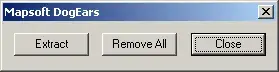
DogEars also lets you extract all marked pages into a new PDF document. When you trigger the extraction, every page that has a DogEar mark is pulled into a new file — unmarked pages are excluded. This is useful for:
- Pulling together the specific pages you need to print or share from a longer document
- Creating a subset document from a large reference manual
- Collecting flagged pages from a review or proofreading pass
Getting DogEars
DogEars is available as a free download. Visit the DogEars download page to download the installer. An installation code is required during setup.
DogEars runs with Acrobat’s Protected Mode switched on, so there is no need to disable it. That matters from December 2026, when Adobe removes the option to turn Protected Mode off and every plug-in has to run inside it — see what this means for your plug-ins.
DogEars vs Bookmarks vs Thumbnails
Acrobat gives you several ways to navigate a PDF, and they serve genuinely different purposes. The bookmarks panel is designed around the document's logical structure — chapters, sections, appendices. It is the author's navigation aid, and in most professionally produced documents it reflects the heading hierarchy. You can jump directly to a chapter, but you cannot easily use it to flag the three specific pages you need to revisit this afternoon.
Page thumbnails are a visual overview. They are brilliant for getting a spatial sense of a long document or dragging pages into a new order, but scrolling through 200 thumbnail images looking for the one you bookmarked mentally is not navigation — it is searching.
DogEars fills the gap between the two. The DogEar mark is personal, immediate, and visible directly on the page without opening any panel. You see the folded corner as you scroll past, the same way you would with a physical book. The toolbar buttons installed by DogEars let you cycle through marked pages with a single click, which is a workflow that neither bookmarks nor thumbnails support natively.
How the DogEar Mark Works
DogEars renders the DogEar as a visual element placed in the top-right corner of the page. The mark is stored as part of the page content rather than as a separate annotation, which means it travels with the page when pages are extracted or rearranged. This is an important distinction from, say, sticky note annotations, which can become detached from their intended context if the document structure changes.
Removing a mark is equally straightforward — click the toolbar button to toggle it off. There is no need to locate the correct annotation layer or hunt through a list. The visual metaphor keeps the interaction simple: fold the corner to mark, unfold to unmark.
Real-World Use Cases
The use cases that come up most often in practice cluster around a few industries where long-document review is a daily reality.
In legal work, solicitors and barristers routinely work with disclosure bundles that can run to thousands of pages. Being able to mark and extract the specific pages relevant to a particular argument — without modifying the original bundle — is genuinely valuable. DogEars lets you build that subset in seconds rather than noting page numbers and manually splitting the document afterwards.
Engineering and construction teams deal with technical specifications, drawings packs, and contract documents that are similarly long. A site manager reviewing a specification might mark pages with outstanding queries, then extract those pages as a separate document for a query log. Architects working through planning documents face the same problem.
In publishing and editorial work, reviewers marking pages for further discussion during a meeting, or editors flagging pages that need author responses, find DogEars faster than inserting annotations. The visual marker on the page is impossible to miss.
Integration with Acrobat Workflows
DogEars installs cleanly into Acrobat's toolbar and menu structure, in the same way as any other Acrobat plugin. Once installed, the marking and navigation controls are always available — there is nothing to configure each time you open a document. The plugin works with Acrobat's existing page view, so there is no mode-switching or separate interface to learn.
The extraction feature integrates with Acrobat's standard document operations. The extracted pages appear in a new Acrobat window as an unsaved document, which you can then save, print, or process further as needed. The original document is unchanged. If you want to clear all marks from a document — before sending it to a client, for instance — there is a global clear option that removes all DogEar marks in one step.
For teams working on shared documents, marks can be left in before distributing a document to indicate pages of interest, giving recipients an immediate visual orientation to the content. This is a simpler alternative to inserting formal annotations when all you need is a quick "look at this page" flag.
Related Navigation Tools
For structured document navigation — tables of contents, hierarchical bookmarks, and page labels — see our other tools:
- Bookmarker — automatically creates structured bookmarks from document headings
- TOCBuilder — generates a formatted, hyperlinked Table of Contents from bookmarks
- PDF Page Labels in Acrobat — setting up logical page numbering schemes
Related Articles
The Importance of Barcodes in Modern Society
Explore the different types of barcodes, their applications across industries, the algorithms behind them, and how they are rendered using fonts, raster, and vector graphics.
Image Formats for PDF: JPEG, PNG, TIFF, and More
Comparing image file formats used in PDF documents — JPEG, PNG, TIFF, JBIG2, CCITT, and JPEG 2000 — their compression methods, quality trade-offs, and best use cases.
Understanding Colour Models: RGB and CMYK
A practical guide to RGB and CMYK colour models — how they work, their differences, and why colour management matters when converting between screen and print.
Download DogEars Free
DogEars is a free Acrobat plugin for marking and navigating pages in long PDF documents.