
FDA Checker
Prepare PDF documents for regulatory submission review. Automated checking, bookmarking, and table of contents generation.
Last updated March 2026
Already a customer? Get the latest version →

Ready now. FDA Checker runs with Acrobat’s Protected Mode switched on, so you no longer need to disable it. Adobe removes the option to turn it off in December 2026 — what this means for your plug-ins.
Browse our free online tools. Mapsoft's PDF Hub offers 55+ free PDF tools in your browser. The FDA Checker plug-in below provides regulated submission compliance checking inside Acrobat — the eCTD-specific validation is not available in the online tools.
Prepare PDFs for Submission Review
FDA Checker supports document preparation. Review the user guide for the checks provided by your version. Bookmarker and TOCBuilder are separate companion products. Check the applicable submission requirements and review the output before submitting.
Preparing PDF documents for FDA regulatory submissions requires strict adherence to formatting guidelines. Mapsoft's FDA compliance tools work together with Adobe Acrobat to help you prepare documents for review -- from proper bookmarking and table of contents structure to page formatting and document organization.
Our step-by-step approach helps organise document preparation, letting you focus on your submission content while our tools handle the technical formatting requirements.
FDA Compliance Tools
A suite of Acrobat plugins designed for regulatory document preparation.
Bookmarker
Automatically create and manage PDF bookmarks from document structure. Generate bookmark hierarchies for submission documents.
TOCBuilder
Generate linked tables of contents for your submission documents. Automatically builds hyperlinked TOC pages with proper formatting and structure.
Compliance Checking
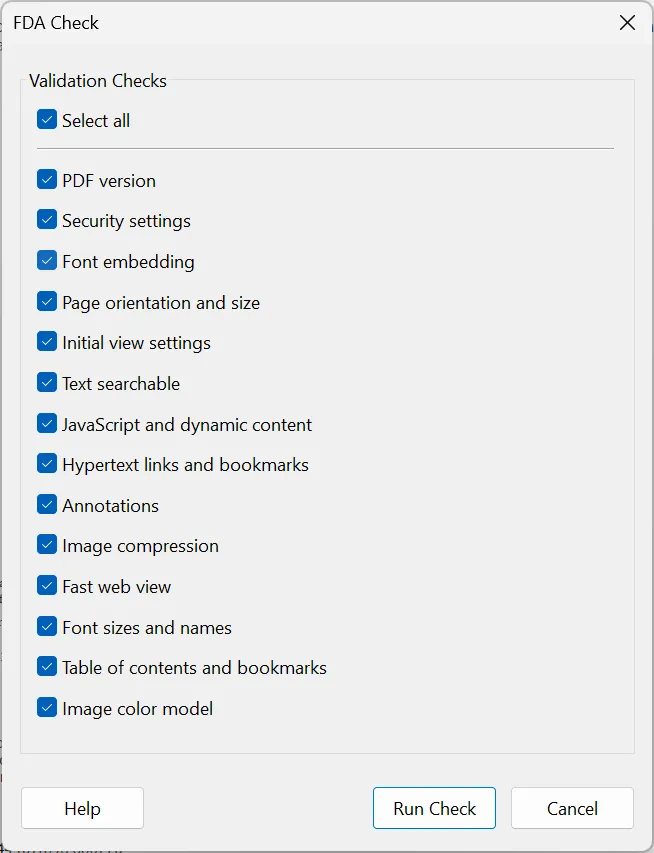
Automated validation of PDF documents against FDA submission guidelines. Identify and resolve compliance issues before submission.
Document Structure
Review page numbering, section organisation and document hierarchy as part of submission preparation.
Page Formatting
Control page sizes, margins, and layout to match FDA specifications. Ensure consistent formatting across all sections of your submission.
Submission-Ready Output
Review the prepared PDFs against the requirements that apply to your submission. Tool output does not establish acceptance of the complete submission.
PDF Preparation Tasks
Our tools address the key technical requirements for FDA PDF submissions.
Bookmark Requirements
Use Bookmarker to create navigation from the document structure, then review the resulting hierarchy against your submission requirements.
Table of Contents
Generate hyperlinked tables of contents and review indentation, numbering and page references.
Document Navigation
Ensure reviewers can easily navigate your submission with properly linked sections, cross-references, and consistent document structure.
File Size & Format
Optimize PDF files for submission, ensuring they meet size requirements and use acceptable fonts, images, and compression settings.
Resources
User Guide
Complete documentation covering FDA Checker features, compliance checks, and configuration options.
Purchase
Ready to buy? Visit the Mapsoft store for FDA Checker and separately listed companion products.
System Requirements
Adobe Acrobat
Adobe Acrobat Pro or Standard (DC, 2020, or 2017). Not compatible with Adobe Acrobat Reader.
Operating System
Windows 10 or Windows 11 (64-bit recommended). Both 32-bit and 64-bit Acrobat installations are supported.
Licence
Perpetual licence with free maintenance period. See licence details and upgrade policy.
See It in Action
Frequently Asked Questions
How do I prepare PDFs for FDA submission?
Mapsoft's FDA Checker tools help ensure PDFs meet FDA requirements for regulatory document preparation, working alongside Bookmarker and TOCBuilder.
What do FDA Checker tools verify?
They help confirm that regulatory PDFs meet FDA expectations for structure such as bookmarks and navigation, supporting submission-ready documents.
Do FDA Checker tools work in Adobe Acrobat Standard?
Yes. The FDA Checker toolset runs as a plug-in in Adobe Acrobat Pro and Acrobat Standard (DC, 2020, and 2017) on Windows 10 and Windows 11. It does not run in Adobe Acrobat Reader, which does not support third-party plug-ins.
Related Articles
Creating FDA-Compliant PDF Submissions
A step-by-step guide to creating FDA-compliant PDFs using Adobe Acrobat, Mapsoft Bookmarker, and Mapsoft TOCBuilder. Covers text searchability, font embedding, bookmarks, and TOC creation.
PDF/A: The Archival PDF Standard
An in-depth guide to PDF/A — the ISO 19005 standard for long-term document archiving. Covers conformance levels, requirements, prohibited features, and conversion workflows.
“The products deliver high quality for a nominal price, backed by the best technical support I’ve encountered.”
Michael Fero — University of Washington
Need Something More?
If this product doesn't quite meet your requirements, we can help. With over 30 years of Adobe development expertise, our team can modify existing products or build entirely custom solutions tailored to your specific workflow. Whether you need additional features, integration with your systems, or a completely bespoke tool, get in touch to discuss your needs.
We also welcome suggestions for new features and new product ideas. If we hear enough requests for a particular capability, it moves up our development priority list — so your feedback directly shapes what we build next.
Beyond off-the-shelf plug-ins, we also build enterprise PDF solutions on the Adobe PDF Library — server-side document processing, generation, validation, conversion and redaction pipelines for high-volume environments. If your need is bigger than a desktop tool, our PDF Library team can build it.
Need Help with FDA Submissions?
$129
One-time purchase · includes 1 year of updates · perpetual licence