
ImagePlacer
Place and precisely position images on PDF pages as overlays or watermarks. Full control over position, scale, rotation, transparency, and blend modes.
Last updated March 2026
Already a customer? Get the latest version →

Ready now. ImagePlacer runs with Acrobat’s Protected Mode switched on, so you no longer need to disable it. Adobe removes the option to turn it off in December 2026 — what this means for your plug-ins.
Try it online first. You can convert images to PDF online for free — no installation, no licence. The plug-in below adds precise image placement on existing PDF pages inside Acrobat, with batch processing.
Overview
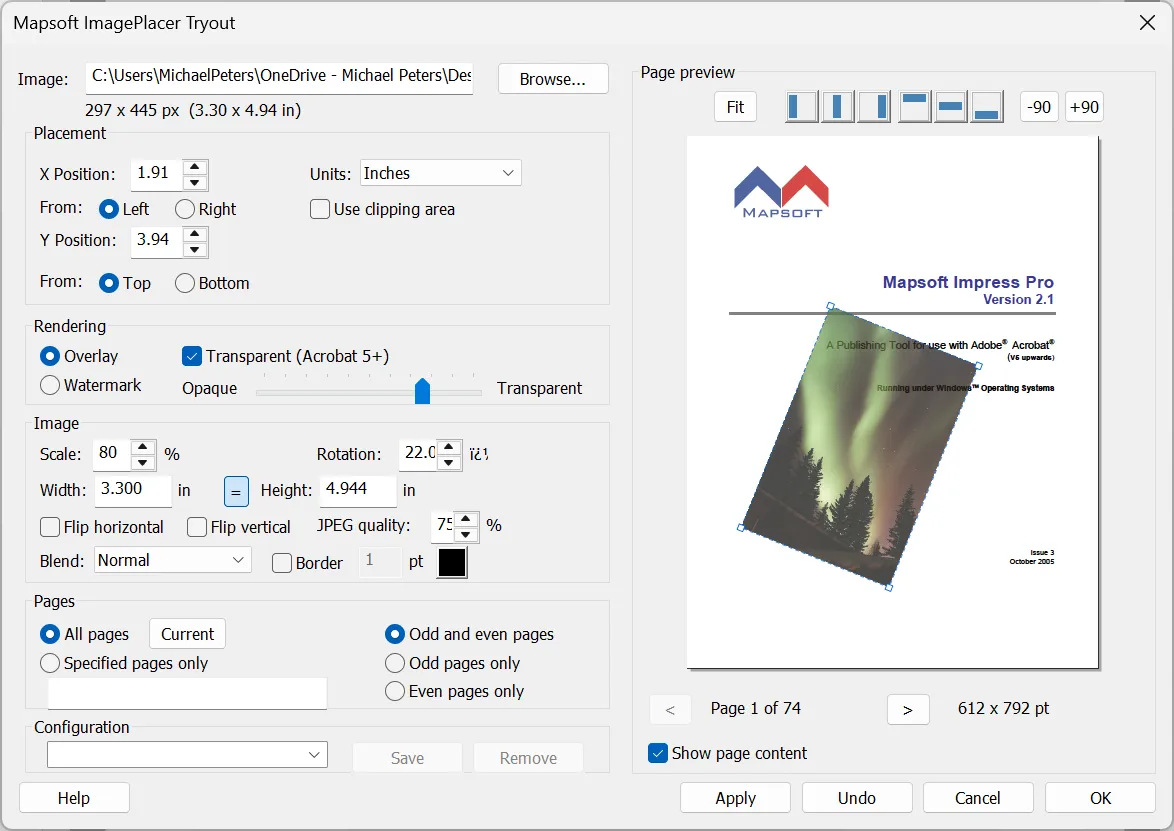
ImagePlacer is an Adobe Acrobat plugin that lets you place and precisely position images on the pages of an open PDF document. Images can be applied as an overlay on top of existing page content or as a watermark behind it, with full control over position, scale, rotation, and transparency.
Whether you need to add logos, stamps, watermarks, or other images to your PDF documents, ImagePlacer gives you pixel-perfect placement with a live preview that updates instantly as you adjust settings. Apply images to a single page, a page range, or all pages at once.
Key Features
Precise image placement tools for Adobe Acrobat.
Overlay & Watermark Modes
Place images on top of existing page content as overlays, or behind it as watermarks. Choose the layering that suits your needs.
Precise Positioning
Set exact X and Y positions in inches, centimetres, or millimetres. Measure from any edge of the page for pixel-perfect placement.
Scale, Rotate & Flip
Resize images by percentage or exact dimensions with locked aspect ratio. Rotate to any angle and flip horizontally or vertically.
Transparency & Blend Modes
Make images semi-transparent and choose from blend modes including Normal, Multiply, Screen, Overlay, Darken, and Lighten.
Live Page Preview
See exactly where your image will appear with an instant live preview. Navigate between pages and use alignment buttons to snap to position.
Flexible Page Ranges
Apply images to all pages, specific page ranges, or odd/even pages only. Ideal for double-sided documents and selective branding.
More Capabilities
ImagePlacer covers every aspect of image placement in PDFs.
Multiple Image Formats
Supports JPEG, TIFF, BMP, GIF, PCX, PNG, Kodak Photo CD, and Targa formats. Non-JPEG images are automatically converted before embedding.
JPEG Quality Control
Set the compression quality from 1 to 100 to balance image clarity against file size. Configurable for each placement.
Border & Outline
Optionally draw a customisable border around placed images with adjustable stroke width and colour.
Saved Configurations
Save and recall complete placement settings (image, position, scale, transparency, page range) as named configurations for quick reuse.
Fit to Page
Automatically calculate the largest scale at which an image fits the page, accounting for rotation. One-click positioning.
COM Automation
Programmatically place images via the COM automation interface. Integrate ImagePlacer into scripts and automated workflows.
Use Cases
ImagePlacer serves a wide range of document production needs.
Document Branding
Place company logos on every page of PDF documents with precise positioning and consistent appearance across all pages.
Watermarking
Add semi-transparent watermark images behind page content for draft marking, copyright protection, or visual identification.
Stamping & Overlays
Apply stamps, seals, signatures, or approval marks to specific pages or page ranges with precise control over placement.
Print Production
Add images to PDF documents for professional print workflows with full control over scale, quality, and positioning.
Resources
User Guide
Complete documentation covering all ImagePlacer features, placement options, and configuration settings.
Download
Download ImagePlacer to start placing images on your PDF documents with precision.
Purchase
Ready to buy? Visit the Mapsoft store to purchase a full ImagePlacer license.
System Requirements
Adobe Acrobat
Adobe Acrobat Pro or Standard (DC, 2020, or 2017). Not compatible with Adobe Acrobat Reader.
Operating System
Windows 10 or Windows 11 (64-bit recommended). Both 32-bit and 64-bit Acrobat installations are supported.
Licence
Perpetual licence with free maintenance period. See licence details and upgrade policy.
Frequently Asked Questions
How do I add an image watermark to a PDF?
ImagePlacer is an Adobe Acrobat plug-in that places images onto PDF pages as overlays or watermarks, with control over position, scale, rotation, and transparency.
Can I place a logo or stamp on every page of a PDF?
Yes. ImagePlacer can position an image across pages with precise placement and adjustable transparency, ideal for logos, watermarks, and approval stamps.
Does ImagePlacer work in Adobe Acrobat Standard?
Yes. ImagePlacer runs as a plug-in in Adobe Acrobat Pro and Acrobat Standard (DC, 2020, and 2017) on Windows 10 and Windows 11. It does not run in Adobe Acrobat Reader, which does not support third-party plug-ins.
Related Articles
How to Add Watermarks to PDF Files
Learn how to add text and image watermarks to PDF files in Adobe Acrobat — covering appearance, page ranges, saving configurations, removal, and programmatic watermarking with JavaScript.
How to Edit PDF Files in Adobe Acrobat
A practical guide to editing text, images, and pages in PDF documents using Adobe Acrobat's Edit PDF tools.
Related Products
Impress
Stamp text onto PDF pages with full font and positioning control — use alongside ImagePlacer for combined text and image overlays.
Impress Pro
Batch text stamping across multiple PDFs — pairs perfectly with ImagePlacer for high-volume branded document production.
MaskIt
Hide or remove content from PDF pages before applying images — clean up documents with MaskIt, then brand them with ImagePlacer.
“Tech support is awesome — responds quickly and has never failed to resolve an issue.”
Chris Utter — CampSystems, Inc.
Need Something More?
If this product doesn't quite meet your requirements, we can help. With over 30 years of Adobe development expertise, our team can modify existing products or build entirely custom solutions tailored to your specific workflow. Whether you need additional features, integration with your systems, or a completely bespoke tool, get in touch to discuss your needs.
We also welcome suggestions for new features and new product ideas. If we hear enough requests for a particular capability, it moves up our development priority list — so your feedback directly shapes what we build next.
Beyond off-the-shelf plug-ins, we also build enterprise PDF solutions on the Adobe PDF Library — server-side document processing, generation, validation, conversion and redaction pipelines for high-volume environments. If your need is bigger than a desktop tool, our PDF Library team can build it.
Place Images on PDFs with Precision
$129
One-time purchase · includes 1 year of updates · perpetual licence