
MaskIt
Mask areas of PDF pages: hide the content inside or outside a rectangle to clean up scans or hide headers, footers and page numbers, on one page or a whole document.
Last updated September 2026
Ready now. MaskIt runs with Acrobat’s Protected Mode switched on, so you no longer need to disable it. The rest of the Mapsoft plug-ins follow over the coming weeks. Adobe removes the option to turn it off in December 2026 — what this means for your plug-ins.
Need content removed for good? MaskIt hides content rather than deleting it. To remove sensitive information permanently, you can try redacting a PDF online for free — no installation, no licence.
Overview
MaskIt is an Adobe Acrobat plug-in that hides chosen areas of PDF pages. Whether you need to clean up scanned documents, hide unwanted logos, headers or old page numbers, or prepare files for further processing such as pagination, MaskIt provides the tools you need with a straightforward, integrated interface inside Adobe Acrobat.
Key Features
Tools for hiding and cleaning up PDF page content.
Content Concealment
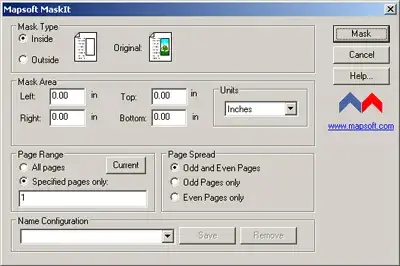
Hide the text, images and graphics in any rectangular area of a page, so they no longer display or print.
Flexible Masking
Create masks to obscure content either inside or outside a defined area, giving you precise control over what is visible.
Rotated Pages
Masks the same area as you see it on pages that are upside-down or sideways, so scans with rotated pages are masked correctly.
Batch Processing
Run saved masks with Mapsoft Acrobatch to mask many documents in one operation, alone or alongside other Mapsoft plug-ins.
Scan Cleanup
Hide unwanted artefacts, logos, headers and other elements on scanned pages for a clean result.
Mask Management
Apply masks and save them for future reuse, enabling consistent masking across multiple documents and workflows.
Use Cases
MaskIt serves a wide range of document clean-up and preparation needs.
Headers, Footers and Page Numbers
Hide old headers, footers or page numbers before re-paginating a document, for example with Mapsoft Impress.
Scanned Document Cleanup
Hide scan artefacts, unwanted logos, stamps and other visual noise on digitised documents.
Isolating an Area
Hide everything outside a chosen area to show only the part of the page that matters, such as a form or a figure.
Document Preparation
Prepare PDFs for pagination, publishing, or further processing by hiding unwanted elements and cleaning up layouts.
System Requirements
Adobe Acrobat
Adobe Acrobat Pro or Standard (DC, 2020, or 2017). Not compatible with Adobe Acrobat Reader.
Operating System
Windows 10 or Windows 11 (64-bit recommended). Both 32-bit and 64-bit Acrobat installations are supported.
Licence
Perpetual licence with free maintenance period. See licence details and upgrade policy.
See It in Action
Frequently Asked Questions
Does MaskIt permanently redact a PDF?
No. MaskIt hides the content of an area of the page: it can no longer be seen or printed, but it remains in the file and may be found by a search or copied with text tools. To remove sensitive content permanently, use a redaction tool such as the Redact tool in Acrobat Pro.
Does Adobe Acrobat have a redaction tool?
Acrobat Pro includes a Redact tool that removes content permanently; Acrobat Standard does not. MaskIt is not a redaction tool: it works in both editions to hide areas of pages, for example to clean up scans and faxes or hide headers, footers and page numbers.
Can I mask multiple PDFs at once?
Yes. Save your mask as a configuration and run it with Mapsoft Acrobatch to apply it to many documents in one operation, alone or together with other Mapsoft plug-ins.
Is masked content really removed, or just hidden?
Hidden. The masked area no longer displays or prints, but the underlying text and images stay in the PDF and can still be extracted with other tools. Do not rely on MaskIt to protect confidential information; use a redaction tool for that.
Does MaskIt work in Acrobat Standard?
Yes. MaskIt runs as a plug-in in Adobe Acrobat Pro and Acrobat Standard (DC, 2020, and 2017) on Windows 10 and Windows 11. It does not run in Adobe Acrobat Reader, which does not support third-party plug-ins.
Related Articles
What is PDF Redaction?
Discover what PDF redaction is, its significance, and how it works in protecting sensitive information in documents.
PDF Security: Passwords, Permissions, and Encryption
A comprehensive guide to PDF security covering password types, permission flags, encryption algorithms, certificate security, and best practices for protecting PDF documents.
Related Products
Flattener
Flatten or remove PDF annotations permanently — use with MaskIt to prepare clean, secure documents for distribution.
ImagePlacer
Add images and watermarks to PDF pages after masking — combine with MaskIt for a complete content replacement workflow.
“This was exactly what we needed. It made our whole project possible.”
Suzanne B. — University of Rochester
Need Something More?
If this product doesn't quite meet your requirements, we can help. With over 30 years of Adobe development expertise, our team can modify existing products or build entirely custom solutions tailored to your specific workflow. Whether you need additional features, integration with your systems, or a completely bespoke tool, get in touch to discuss your needs.
We also welcome suggestions for new features and new product ideas. If we hear enough requests for a particular capability, it moves up our development priority list — so your feedback directly shapes what we build next.
Beyond off-the-shelf plug-ins, we also build enterprise PDF solutions on the Adobe PDF Library — server-side document processing, generation, validation, conversion and redaction pipelines for high-volume environments. If your need is bigger than a desktop tool, our PDF Library team can build it.
Ready to Mask Your PDF Pages?
$129
One-time purchase · includes 1 year of updates · perpetual licence