
Flattener
An Adobe Acrobat plugin to flatten or remove annotations in PDF documents for secure sharing, archiving, and compliance.
Last updated March 2026
Try it online first. You can flatten PDF annotations and form fields online for free — no installation, no licence. The plug-in below brings the same engine into Acrobat with batch processing.
Overview
Flattener is a powerful Adobe Acrobat plugin that gives you complete control over annotations in your PDF documents. Whether you need to flatten annotations into the page content so they become a permanent, non-editable part of the document, or remove them entirely, Flattener handles it with precision.
This is essential for organisations that share documents externally, submit regulatory filings, or archive finalised documents. Flattening ensures that comments, markups, form fields, and other annotations are locked in place — preventing unintended edits and preserving document integrity.
Key Features
Comprehensive annotation management for your PDF workflows.
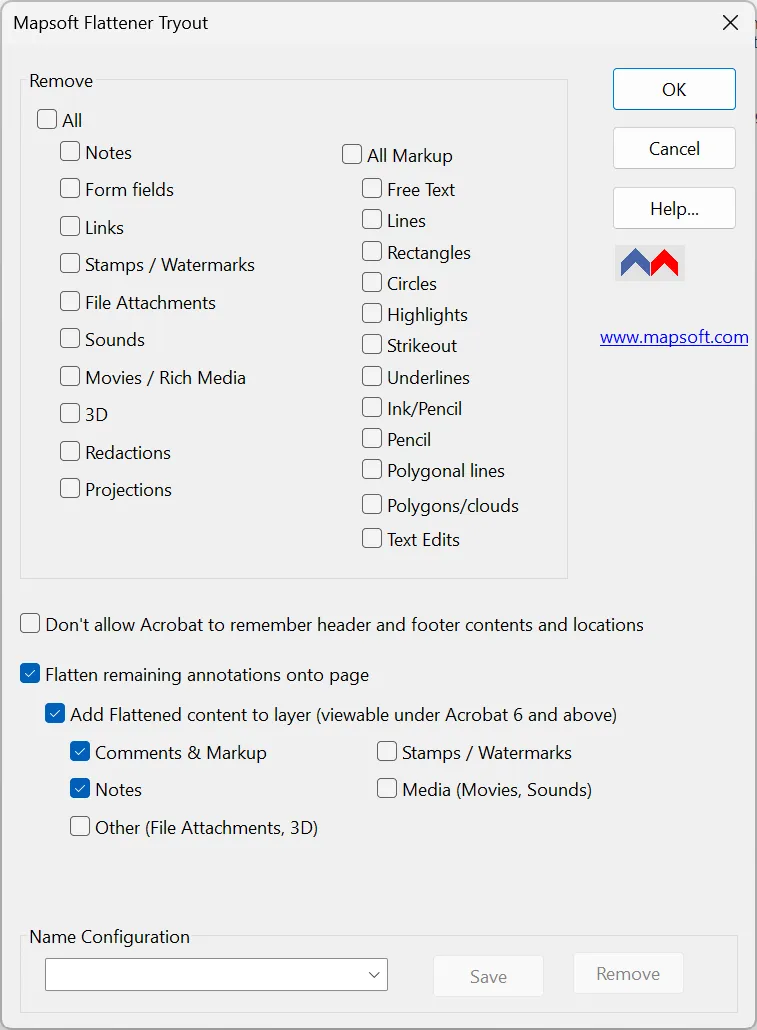
Flatten Annotations
Convert interactive annotations into static page content, making them a permanent part of the PDF that cannot be edited or deleted.
Remove Annotations
Completely strip annotations from PDFs, producing clean documents free of comments, markups, and interactive elements.
Selective Processing
Choose which annotation types to flatten or remove, giving you granular control over the final output.
Form Field Flattening
Flatten filled form fields to lock in data and prevent any further changes to submitted forms.
Document Security
Ensure sensitive annotations and comments are either permanently embedded or completely removed before sharing.
Acrobat Integration
Works seamlessly within Adobe Acrobat as a native plugin, accessible directly from the Acrobat interface.
Common Use Cases
- Prepare documents for external distribution by removing internal review comments
- Flatten form fields after submission to create a tamper-proof record
- Archive finalised documents with annotations permanently embedded
- Meet regulatory or compliance requirements that demand clean PDF submissions
- Remove markup and redline comments before publishing final versions
- Prepare PDFs for print by flattening all interactive elements
Resources
Get started with Flattener using the guides and downloads below.
User Guide
Complete documentation covering all Flattener features and configuration options.
Download Free
Flattener is now a free download for lifetime use. No licence or activation required.
System Requirements
Adobe Acrobat
Adobe Acrobat Pro or Standard (DC, 2020, or 2017). Not compatible with Adobe Acrobat Reader.
Operating System
Windows 10 or Windows 11 (64-bit recommended). Both 32-bit and 64-bit Acrobat installations are supported.
Licence
Free to use. No licence or activation required.
Related Articles
PDF Annotations: Types and Usage
A comprehensive guide to PDF annotations: the different types, how they are stored in the PDF format, review workflows, flattening, and scripting with Acrobat JavaScript.
How to Edit PDF Files in Adobe Acrobat
A practical guide to editing text, images, and pages in PDF documents using Adobe Acrobat's Edit PDF tools.
Related Products
MaskIt
Hide or remove specific content regions from PDF pages — works well with Flattener for thorough document preparation before sharing.
Impress
Stamp text labels onto PDF pages — use Flattener first to lock existing annotations, then add new stamps with Impress.
“Works flawlessly. The best thing since sliced bread.”
Randall Laco — Financial Insurance Management Corp.
Need Something More?
If this product doesn't quite meet your requirements, we can help. With over 30 years of Adobe development expertise, our team can modify existing products or build entirely custom solutions tailored to your specific workflow. Whether you need additional features, integration with your systems, or a completely bespoke tool, get in touch to discuss your needs.
We also welcome suggestions for new features and new product ideas. If we hear enough requests for a particular capability, it moves up our development priority list — so your feedback directly shapes what we build next.
Beyond off-the-shelf plug-ins, we also build enterprise PDF solutions on the Adobe PDF Library — server-side document processing, generation, validation, conversion and redaction pipelines for high-volume environments. If your need is bigger than a desktop tool, our PDF Library team can build it.