
ContentScaler
A professional publishing tool for Adobe Acrobat that gives you complete control over PDF page scaling, content sizing, and appearance preferences.
Last updated March 2026
Using it across your organisation? Support plans from $650/yr add priority email support, deployment help and compatibility updates.

Ready now. ContentScaler runs with Acrobat’s Protected Mode switched on, so you no longer need to disable it. Adobe removes the option to turn it off in December 2026 — what this means for your plug-ins.
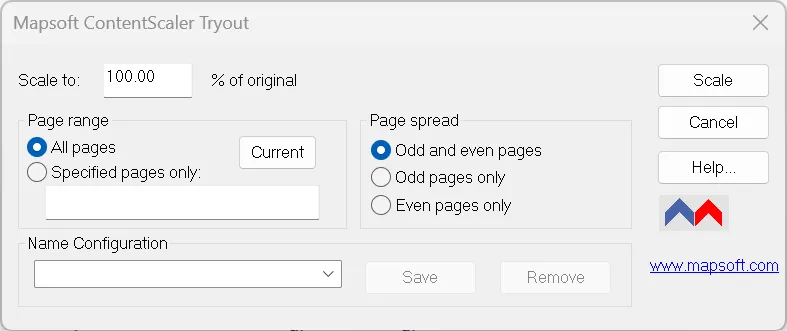
Try it online first. You can resize PDF pages online for free — no installation, no licence. The plug-in below scales page content (rather than just the page box) inside Acrobat, with batch processing.
Professional PDF Page Scaling & Content Control
ContentScaler is a publishing tool for use with Adobe Acrobat (V10 upwards) that provides precise control over how PDF page content is scaled, sized, and presented. Whether you need to resize pages for different print formats, adjust content scaling for compliance documents, or change appearance preferences across an entire document, ContentScaler handles it all.
From adjusting media page sizes to fine-tuning content positioning, ContentScaler gives publishing professionals the tools they need to produce perfectly formatted PDF documents every time.
Key Features
Complete control over PDF page layout, scaling, and appearance.
Page Scaling
Scale PDF page content up or down with precision. Resize content to fit different page formats while maintaining proportions and quality.
Media Page Size
Change the media page size of PDF documents to match your target output format. Support for standard and custom page dimensions.
Appearance Preferences
Open, change, and apply appearance preferences across PDF documents. Control visual settings and display options for consistent presentation.
Content Positioning
Adjust the position and alignment of content on the page. Center, offset, or reposition content to achieve the exact layout you need.
Batch Processing
Apply scaling and formatting changes across multiple pages or entire documents in a single operation for efficient production workflows.
Publishing-Ready Output
Produce PDF documents formatted and scaled precisely for your target publishing or printing requirements.
Use Cases
ContentScaler serves publishing, printing, and compliance professionals.
Print Production
Resize and scale PDF content to match different print formats -- from business cards to large-format posters -- while preserving quality.
Regulatory Submissions
Ensure documents meet specific page size and formatting requirements for FDA, legal, or government submissions.
Document Standardization
Normalize page sizes and content scaling across documents from different sources into a consistent format.
Publishing Workflows
Prepare PDF content for digital and print publishing with precise control over layout, margins, and content placement.
Resources
User Guide
Complete documentation for ContentScaler, covering all scaling, sizing, and appearance features.
Download Free
Download ContentScaler free of charge and start scaling and formatting your PDF documents professionally.
Support
Need a hand? Visit our support pages for help with installation, configuration, and troubleshooting.
System Requirements
Adobe Acrobat
Adobe Acrobat Pro or Standard (DC, 2020, or 2017). Not compatible with Adobe Acrobat Reader.
Operating System
Windows 10 or Windows 11 (64-bit recommended). Both 32-bit and 64-bit Acrobat installations are supported.
Licence
Free to use. No licence or activation required.
Frequently Asked Questions
How do I scale the content of a PDF page?
ContentScaler is a free Adobe Acrobat plug-in that scales, resizes, and adjusts the content and appearance of PDF pages.
Can ContentScaler resize content without changing the page size?
Yes. ContentScaler adjusts page content independently, so you can scale or reposition content to meet layout and output requirements.
Is ContentScaler free?
Yes. ContentScaler is a free Adobe Acrobat publishing plug-in for Acrobat version 10 and later on Windows.
Related Articles
How to Rotate Pages in a PDF
How to permanently rotate individual pages or all pages in a PDF document using Adobe Acrobat, including saving the rotation correctly.
PDF Page Boxes: MediaBox, CropBox, BleedBox, TrimBox, and ArtBox
Understanding the five PDF page box types — what they define, how they're used in professional print production, and how to view them in Acrobat Pro.
Related Products
MediaSizer
Change and rescale the media size of PDF pages — focused on page dimensions where ContentScaler handles full content scaling.
“I can’t imagine life without it. It dramatically simplifies my daily work.”
Kent Bowler — structuregenius.com
Need Something More?
If this product doesn't quite meet your requirements, we can help. With over 30 years of Adobe development expertise, our team can modify existing products or build entirely custom solutions tailored to your specific workflow. Whether you need additional features, integration with your systems, or a completely bespoke tool, get in touch to discuss your needs.
We also welcome suggestions for new features and new product ideas. If we hear enough requests for a particular capability, it moves up our development priority list — so your feedback directly shapes what we build next.
Beyond off-the-shelf plug-ins, we also build enterprise PDF solutions on the Adobe PDF Library — server-side document processing, generation, validation, conversion and redaction pipelines for high-volume environments. If your need is bigger than a desktop tool, our PDF Library team can build it.