
Adobe Acrobat Versions: The Complete List (1993–2026), Reader vs Standard vs Pro, and How to Check Yours
A reference table of every Adobe Acrobat release — version numbers, names, dates and PDF support — plus the product lines, the version-numbering scheme, the current build, and how to find out which one you are running.
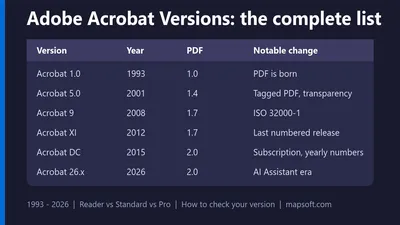
Adobe has shipped Acrobat under three different numbering schemes in 33 years: plain integers (1.0 to 9), Roman numerals (X and XI), and since 2015 year-based build numbers such as 26.003.22110. Add the free Reader, the Standard and Pro editions, the short-lived “DC” suffix and the parallel perpetual releases, and it is genuinely hard to answer simple questions like which version do I have? and what is the latest one? This page is the reference we wished existed. If you want the story behind the releases rather than the data, read our narrative Adobe Acrobat version history instead.
Latest version (as of 24 November 2026): Acrobat and Acrobat Reader 26.003.22110 on the Continuous track, released 16 November 2026. The Acrobat 2024 track is at 24.001.30429 (8 September 2026). Source: Adobe’s Acrobat and Reader release notes. Details below.
Every Adobe Acrobat version, 1993–2026
Acrobat Reader, Standard and Pro have always shared the same version number and release date, so one row covers all editions. “PDF version” is the newest PDF specification that release could write. Dates are Adobe’s announced availability dates; where only a month is reliably documented, only the month is given.
| Version | Marketing name(s) | Released | PDF version | Notable changes |
|---|---|---|---|---|
| 1.0 | Acrobat Reader, Acrobat Exchange, Acrobat Distiller | 15 June 1993 | PDF 1.0 | First release; Mac and DOS/Windows 3.1; text, vector graphics, images and hyperlinks in a fixed-layout file. Reader initially cost $50 and became free in 1994. |
| 2.0 | Acrobat Reader / Exchange / Pro | September 1994 | PDF 1.1 | Password security, device-independent colour, article threads; Acrobat Catalog for full-text indexes; first Unix and OS/2 ports. |
| 3.0 | Acrobat Reader / Exchange | November 1996 | PDF 1.2 | Interactive form fields (AcroForms), the plug-in architecture and SDK that third-party Acrobat plug-ins still use, CJK fonts, web browser plug-in. Last version for Windows 3.1x. |
| 4.0 | Acrobat Reader, Acrobat (Exchange renamed) | April 1999 | PDF 1.3 | JavaScript, digital signatures, Web Capture, smooth shading and ICC colour. The 4.05 update (2000) gained the Acrobat Access plug-in, Adobe’s first screen-reader support. |
| 5.0 | Acrobat Reader, Acrobat | May 2001 | PDF 1.4 | Transparency, Tagged PDF for accessibility, 128-bit encryption, XML form-data export, expanded JavaScript API. |
| 6.0 | Adobe Reader, Acrobat Elements, Acrobat Standard, Acrobat Professional | July 2003 | PDF 1.5 | Layers (optional content), JPEG 2000, Review & Comment, new interface. Reader renamed “Adobe Reader”; Standard and Professional editions introduced. |
| 7.0 | Adobe Reader, Acrobat Standard / Professional, Acrobat 3D | December 2004 (on sale early 2005) | PDF 1.6 | Embedded 3D (U3D), AES encryption, OpenType embedding, LiveCycle Designer bundled, Reader-enabled commenting; first Creative Suite bundle. Product activation introduced. |
| 8 | Adobe Reader, Acrobat Standard / Professional / 3D | 3 November 2006 | PDF 1.7 | PDF Packages (precursor of Portfolios), shared reviews, Acrobat Connect, document comparison, PRC 3D format. Support ended November 2011. |
| 9 | Adobe Reader, Acrobat Standard / Pro / Pro Extended | 2 June 2008 | PDF 1.7 (ISO 32000-1) + Adobe Extension Level 3 | Flash and H.264 playback, PDF Portfolios, ClearScan OCR, improved redaction; Pro Extended was the most complete desktop Acrobat ever. Support ended 26 June 2013. |
| X (10) | Adobe Reader X, Acrobat X Standard / Pro / Suite | 15 November 2010 | PDF 1.7 + Extension Level 8 | Protected Mode sandbox in Reader, Action Wizard replacing Batch Processing, redesigned task-pane UI, PDF/A validation. Support ended 15 November 2015. |
| XI (11) | Adobe Reader XI, Acrobat XI Standard / Pro | 15 October 2012 | PDF 1.7 + Extension Level 8 | Edit text and images in place, export to PowerPoint, FormsCentral, cloud-storage integration. Last version sold only as a classic perpetual licence. Support ended 15 October 2017. |
| DC 2015 (15.x) | Acrobat Reader DC, Acrobat Standard DC, Acrobat Pro DC; Acrobat 2015 (Classic) | 6 April 2015 | PDF 1.7 (reads PDF 2.0) | Subscription licensing under the Document Cloud brand; Continuous and Classic tracks; year-based version numbers; touch UI, tabbed documents, mobile apps, Adobe Sign integration. Reader regained the “Acrobat Reader” name. Classic 2015 support ended 7 April 2020. |
| 2017 (17.x Classic) | Acrobat Standard 2017, Acrobat Pro 2017, Reader 2017 | 6 June 2017 | PDF 1.7 (reads PDF 2.0) | Second perpetual Classic-track release; fixes only, no new features. Support ended 6 June 2022. |
| 2020 (20.x Classic) | Acrobat Standard 2020, Acrobat Pro 2020, Reader 2020 | 1 June 2020 | PDF 2.0 | Last genuinely perpetual Acrobat. Sales ended 31 May 2025; support ended 30 November 2025. |
| 22.003 (Continuous) | Acrobat Reader, Acrobat Standard, Acrobat Pro (“DC” dropped) | 11 October 2022 | PDF 2.0 | Document Cloud suffix removed from every product name; native 64-bit builds; macOS Ventura support. |
| 2024 (24.001 track) | Acrobat Classic, later Acrobat Standard 2024 / Acrobat Pro 2024 | 2024 (first update 13 August 2024) | PDF 2.0 | Successor to Acrobat 2020 for organisations that cannot run the Continuous track; sold as a one-time purchase with up to three years of access rather than a perpetual licence. Builds are numbered 24.001.3xxxx. |
| 24.x–26.x (Continuous) | Acrobat Reader, Acrobat Standard, Acrobat Pro | 2024–2026 (rolling) | PDF 2.0 | AI Assistant for Acrobat, Generate presentation, AI image generation with Adobe Express, web search inside AI Assistant, DirectX 12 GPU rendering, Chromium Embedded Framework replaced by WebView. Current build 26.003.22110 (16 November 2026). |
Sources: Adobe Acrobat and Reader release notes, Adobe supported product versions, and Adobe Acrobat version history on Wikipedia for the pre-2015 dates.
The Acrobat product lines: Reader, Standard and Pro
Every version in the table above was sold as a family rather than a single program. The names have shifted over the years, but since Acrobat 6 (2003) the line-up has been stable: a free viewer and two paid editions.
Acrobat Reader (free)
The free viewer has had four names: Acrobat Reader (1993–2003), Adobe Reader (versions 6 to XI, 2003–2012), Acrobat Reader DC (2015–2022) and plain Acrobat Reader again since October 2022. It views, prints, comments on, fills in and signs PDFs, and it can load third-party plug-ins built for Reader, but it cannot create or edit PDFs. Reader follows the Continuous track; a separate Reader 2020 existed for the Classic track and ended with it on 30 November 2025.
Acrobat Standard
Introduced with Acrobat 6 and Windows-only throughout, Standard adds PDF creation from any application, basic text and image editing, form creation, password security and certificate signing. It is the edition most office users actually need.
Acrobat Pro
Called Acrobat Professional from 6 to 8 and Acrobat Pro since 9, this is the full product on Windows and macOS: OCR, redaction, accessibility checking and remediation, Preflight, PDF/A and PDF/X validation, Compare Files, the Action Wizard for batch work, and the SDK hooks that plug-in developers rely on. Our Acrobat Standard vs Pro comparison goes through the feature differences one by one.
Editions that came and went
- Acrobat Exchange (1.0–3.0) was the original paid editor, renamed simply “Acrobat” in 4.0.
- Acrobat Elements (6–8) was a volume-licensed PDF-creation-only edition.
- Acrobat 3D (7 and 8 era) and Acrobat 9 Pro Extended bundled CAD conversion and 3D tooling that later folded into Pro or disappeared.
- Acrobat X Suite (2010) packaged Acrobat X Pro with Photoshop, Captivate, Presenter, LiveCycle Designer and Media Encoder.
- Acrobat Studio (2025) is a subscription bundle that layers PDF Spaces and Adobe Express on top of Acrobat Pro; see our note on PDF Spaces.
“DC”, Classic vs Continuous, and the perpetual releases
Acrobat DC arrived on 6 April 2015 and changed three things at once: licensing moved to subscription, the version number moved to a year-based scheme (15.x), and the Document Cloud suffix was added to every product name. Adobe removed the “DC” on 11 October 2022, at the point where the Continuous track went from 22.002 to 22.003, so Acrobat Pro DC and Acrobat Pro are the same product line and an About box that still says DC simply means an older build.
Since 2015 Acrobat has shipped on two tracks:
- The Continuous track is what subscribers and Reader users get. Features arrive several times a year rather than in a big annual release; the version number tells you the year and the feature release (
26.003.xis the third feature release of 2026). - The Classic track freezes the feature set at a point in time and then receives only security and stability fixes. Adobe sold it as a perpetual licence three times — Acrobat 2015, Acrobat 2017 (6 June 2017) and Acrobat 2020 (1 June 2020) — each supported for roughly five years. Acrobat 2020, the last true perpetual release, reached end of support on 30 November 2025 after Adobe extended it from the original June 2025 date.
- Acrobat 2024, briefly marketed as Acrobat Classic before being renamed Acrobat Pro 2024 and Acrobat Standard 2024, replaces the Classic track for organisations that cannot take rolling updates. It is a one-time, non-recurring purchase that provides up to three years of access rather than a licence in perpetuity, and its builds are numbered
24.001.3xxxx. The latest is 24.001.30429 (8 September 2026).
How to check which Acrobat version you have
- Windows: click Menu (the ☰ button at the top left of the new interface) or Help in the classic interface, then About Adobe Acrobat (or About Adobe Acrobat Reader).
- macOS: choose Acrobat > About Acrobat (or Acrobat Reader > About Acrobat Reader) from the menu bar.
- The About box shows the product name and the full build, for example
Adobe Acrobat Pro (64-bit) — Version 2026.003.22110. Some dialogs show the year as four digits (2026.003.22110) and the release notes as two (26.003.22110); they are the same number. - Without opening Acrobat, Windows Settings > Apps > Installed apps and the macOS Finder Get Info panel list the same version string.
Reading the version number
| Build looks like | What you have |
|---|---|
26.003.22110, 25.001.2xxxx, 24.00x.2xxxx | Continuous track (Acrobat subscription or free Reader). First number = year, second = feature release, third = build. Builds on this track end in a five-digit number beginning with 2. |
24.001.3xxxx | Acrobat 2024 track (Acrobat Pro 2024 / Standard 2024, formerly Acrobat Classic). Supported. |
20.005.3xxxx | Acrobat 2020 Classic. Unsupported since 30 November 2025. |
17.011.3xxxx | Acrobat 2017 Classic. Unsupported since 6 June 2022. |
15.006.3xxxx | Acrobat 2015 Classic. Unsupported since 7 April 2020. |
11.0.x, 10.1.x, 9.5.x | Acrobat XI, X or 9. Long out of support. |
To check the PDF file version rather than the application version — a different question that people often mix up — open File > Properties in Acrobat or use our free PDF version checker; our PDF 1.7 vs 2.0 comparison explains what the file versions mean.
What is the latest version of Adobe Acrobat?
As of 24 November 2026, the latest version of Adobe Acrobat (Pro and Standard) and Adobe Acrobat Reader is 26.003.22110, a planned update that Adobe released on 16 November 2026 on the Continuous track. It followed 26.003.22075 on 2 November 2026 and the 26.002 feature releases of September and October. On the Acrobat 2024 track the current build is 24.001.30429, released 8 September 2026. Adobe lists every build, with dates and security bulletins, on its Acrobat and Reader release-notes index; that page is the authority and we check this article against it when we update it.
Acrobat updates itself by default. If your About box shows an older 26.x build, choose Help > Check for updates (Menu > Help on Windows); if it shows 2020 or earlier, the only route to a supported version is Acrobat Pro 2024 / Standard 2024 or a subscription to Acrobat Pro.
Frequently asked questions
What is the latest version of Adobe Acrobat?
As of 24 November 2026 the latest release on the Continuous track is 26.003.22110, published by Adobe on 16 November 2026. The Acrobat 2024 track is at 24.001.30429 (8 September 2026). Adobe’s release-notes page is the authoritative place to check.
How do I check which version of Adobe Acrobat I have?
Windows: Menu (or Help) > About Adobe Acrobat. Mac: Acrobat > About Acrobat. The dialog shows the full build number; the first two digits are the release year, the middle group the feature release, and the last group the build. A build starting 24.001 is the Acrobat 2024 track and one starting 20.005 is the discontinued Acrobat 2020 track.
Has Adobe Acrobat DC been discontinued?
Only the name. Adobe added the DC (Document Cloud) suffix in April 2015 and removed it on 11 October 2022, when the Continuous track moved from 22.002 to 22.003. Acrobat Pro DC became Acrobat Pro, Standard DC became Standard and Reader DC became Reader. An About box that still says DC just means the installation predates October 2022.
What is the difference between Acrobat Reader, Standard and Pro?
Reader is free and views, prints, comments, fills and signs but cannot create or edit. Standard (Windows only) adds PDF creation, basic editing, form creation and password security. Pro (Windows and macOS) adds OCR, redaction, accessibility checking, Preflight, PDF/A and PDF/X validation, Compare Files and the Action Wizard. All three share the same version numbers and release dates.
Which Adobe Acrobat versions are still supported?
As of November 2026: the Continuous track (currently 26.x) and the Acrobat 2024 track. Acrobat 2020 reached end of support on 30 November 2025, Acrobat 2017 on 6 June 2022, Acrobat XI on 15 October 2017 and Acrobat X on 15 November 2015. Older versions still run but receive no security fixes.
Is Acrobat Pro 2024 a perpetual licence?
Not in the traditional sense. Acrobat Pro 2024 and Standard 2024 — first marketed as Acrobat Classic — are a one-time, non-recurring purchase providing up to three years of access, replacing the genuinely perpetual Acrobat 2020. They receive fixes on the 24.001.3xxxx track but not the new features that arrive on the subscription Continuous track.
Related reading
- Adobe Acrobat version history — the narrative companion to this table.
- Acrobat Standard vs Pro — feature-by-feature edition comparison.
- PDF 1.7 vs PDF 2.0 — the file-format versions, as opposed to the application versions.
- Acrobat alternatives — if you are on an unsupported version and weighing up the options.
Related Articles
Adobe Acrobat Version History
The story behind the table: how Acrobat evolved from the Camelot project through the Creative Suite and Document Cloud eras to today’s AI features.
Adobe Acrobat Versions: Reader vs Standard vs Pro
Compare every Adobe Acrobat edition — Reader, Standard, and Pro. Feature comparison, pricing, and which edition is right for your workflow.
PDF 2.0 vs 1.7: Key Differences Between Versions
The PDF file-format versions explained: what changed in PDF 2.0, what was removed, and what it means for your documents.
Extend Acrobat with Mapsoft Plugins
Mapsoft has been building Adobe Acrobat plugins for over 25 years. Our tools automate bookmarking, table of contents generation, stamping, page labelling, and more.