
InDesign Batch Processing: Folder Loops, Naming, and Multi-Format Export
Most InDesign batch jobs follow the same five-file skeleton: open, work, save or export, close, log. The interesting work is the discipline around it — naming, error handling, multi-format export, when to escalate from a script to InDesign Server. Here’s the production pattern.
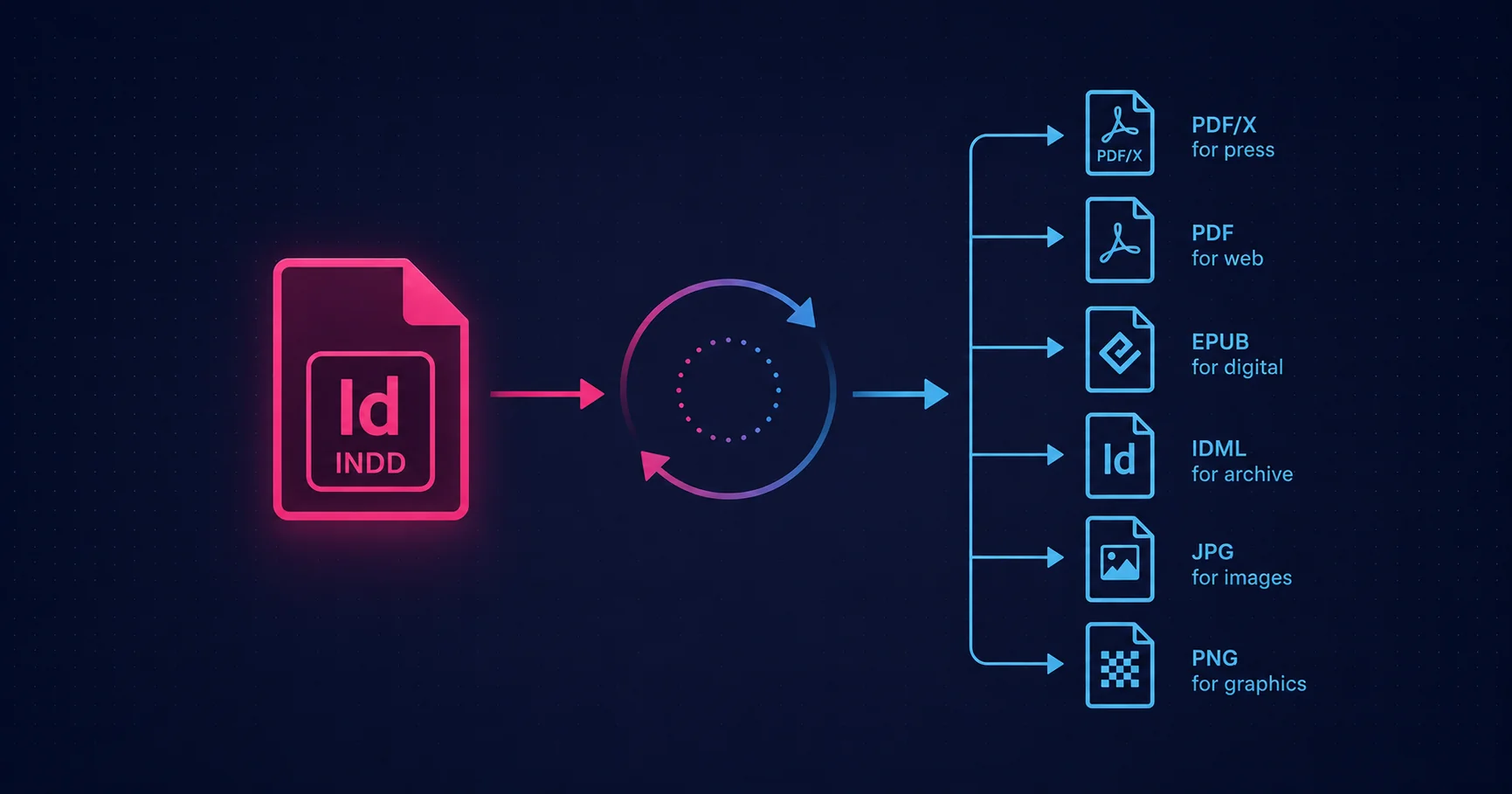
The three batch options
InDesign gives you three ways to apply the same operation to many files. Pick the simplest one that does the job.
1. ExtendScript folder loop — the desktop workhorse
The production answer for most desktop batch work. File → Scripts → Other Script… runs a .jsx file that opens each file in a folder, does the work, and saves or exports the result. The shape:
(function () {
  var srcFolder = Folder.selectDialog('Choose source folder');
  if (!srcFolder) return;
  var dstFolder = Folder.selectDialog('Choose destination folder');
  if (!dstFolder) return;

  app.scriptPreferences.userInteractionLevel =
    UserInteractionLevels.NEVER_INTERACT;

  var files = srcFolder.getFiles('*.indd');
  var ok = 0, errs = [];

  for (var i = 0; i < files.length; i++) {
    try {
      var doc = app.open(files[i]);
      processFile(doc, dstFolder);
      doc.close(SaveOptions.NO);
      ok++;
    } catch (e) {
      errs.push(files[i].name + ': ' + (e.message || e));
      while (app.documents.length > 0) {
        app.documents[0].close(SaveOptions.NO);
      }
    }
  }

  writeLog(dstFolder, ok, errs);
}());
That skeleton is the basis of most production InDesign batch scripts. Everything else is filling in the work that goes inside processFile.
2. UXP plugin with batch UI — for configuration-heavy jobs
When batch jobs need parameter selection frequently — choose a preset, pick a manifest, configure naming — a UXP plugin with a batch panel is the right answer. The plugin provides the UI; the actual batch processing runs as the panel iterates over files. Useful when batch jobs are run by users (not developers) and configuration discoverability matters. Covered in UXP for InDesign.
3. InDesign Server — for unattended high volume
Beyond what desktop InDesign can reasonably handle — thousands of documents per day, hot-folder workflows, web-driven publishing pipelines — the right host is InDesign Server. Same composition core, but headless and designed for queue-driven production. We cover the architecture in InDesign Server for automated publishing; the relevant point here is that the same ExtendScript that runs your desktop batch usually runs (with minor adjustments) on Server too.
Naming conventions that survive a re-run
The single most important production decision in any InDesign batch is the output naming convention. Three rules:
- Output is reproducible from input. The output filename should be derivable from the input filename and the export type alone, with no random or time-based components.
brochure-2026-spring.indd → brochure-2026-spring-press.pdf, brochure-2026-spring-web.pdfis good;output-1842.pdfis bad. - Re-running the batch is idempotent. If the script has already produced
brochure-2026-spring-press.pdffrom a source, re-running should overwrite the same file. Uniqueness suffixes break idempotence and producebrochure-2026-spring-press-2.pdfpiles that nobody can reason about. - Output goes to a sibling folder, not the source folder. Mixing input and output in the same folder makes the next batch run pick up its own outputs as inputs, with predictably bad results.
The naming pattern that works in production: <source-name-without-ext>-<variant>.<ext>, where variant is one of press, web, archive, epub — a short, stable token that identifies the output flavour.
Multi-format export from a single source
Most production batches need multiple outputs per input. The classic case: a folder of .indd source files needs to be exported as PDF/X-4 (press), web-optimised PDF, EPUB (digital), and IDML (archive). Doing each separately is fragile (state can drift between runs); doing all four in one ExtendScript pass is reliable.
The pattern wraps each file in a single open/work/close cycle, with multiple export calls inside:
function processFile(doc, dst) {
  var base = doc.name.replace(/\.indd$/i, '');

  // Press-quality PDF (PDF/X-4)
  doc.exportFile(ExportFormat.PDF_TYPE,
    new File(dst.fsName + '/' + base + '-press.pdf'),
    false, app.pdfExportPresets.itemByName('[PDF/X-4:2010]'));

  // Web-optimised PDF (Smallest File Size)
  doc.exportFile(ExportFormat.PDF_TYPE,
    new File(dst.fsName + '/' + base + '-web.pdf'),
    false, app.pdfExportPresets.itemByName('[Smallest File Size]'));

  // EPUB for digital
  doc.exportFile(ExportFormat.EPUB,
    new File(dst.fsName + '/' + base + '.epub'));

  // IDML for archive
  doc.exportFile(ExportFormat.INDESIGN_MARKUP,
    new File(dst.fsName + '/' + base + '.idml'));
}
One open per file, four outputs per file. The source document state is consistent across all four exports because they share the same in-memory document. The print/web parameter differences are covered in Print PDF vs Web PDF.
Error handling that doesn’t halt the batch
The single biggest source of pain in production InDesign batches is unhandled errors. A 200-file batch that aborts on file 73 because of a missing font leaves you with 73 outputs and 127 unprocessed inputs — and no clear log of which files succeeded.
The reliable pattern is per-file try/catch with errors written to a log:
app.scriptPreferences.userInteractionLevel =
  UserInteractionLevels.NEVER_INTERACT;

var ok = 0, errs = [];
for (var i = 0; i < files.length; i++) {
  try {
    var doc = app.open(files[i]);
    processFile(doc, dstFolder);
    doc.close(SaveOptions.NO);
    ok++;
  } catch (e) {
    errs.push(files[i].name + ': ' + (e.message || e));
    while (app.documents.length > 0) {
      app.documents[0].close(SaveOptions.NO);
    }
  }
}

var logFile = new File(dstFolder.fsName + '/batch-log.txt');
logFile.open('w');
logFile.writeln('Batch run: ' + new Date().toString());
logFile.writeln('Processed OK: ' + ok);
logFile.writeln('Errors: ' + errs.length);
for (var j = 0; j < errs.length; j++) logFile.writeln(' - ' + errs[j]);
logFile.close();
Two non-obvious details. First, NEVER_INTERACT suppresses InDesign’s warning dialogs (missing fonts, modified linked images, colour profile mismatches) so the batch doesn’t halt waiting for human acknowledgement. Second, the catch clause closes any document left open when the error fired — otherwise a script that fails partway through accumulates open documents, eventually exhausting memory.
Manifest-driven batches
Many production batches are driven by a CSV or JSON manifest rather than by simply iterating a folder. The shape: each row of the input data describes one job — which template to open, which substitutions to make, what to name the output. The script reads the manifest and processes one row per loop iteration. The most common application is variable-data printing — covered in detail in InDesign Data Merge for variable data printing.
Common batch patterns
Standardising document properties
Walk every file in a folder; check that document title, author, keywords, and PDF metadata match a brand standard; correct anything non-conforming; save the file back. The most-deployed batch in editorial production.
Brand-style enforcement
For every file, check that paragraph styles, character styles, swatches, and master-page conventions match a central library. Replace non-canonical styles with their library counterparts; flag anything unrecognised. The script that turns a multi-designer chaos into a consistent house style.
Preflight at scale
InDesign’s native preflight rules can be exported and shared. A batch script applies the same preflight profile to every document in a folder and produces a CSV of warnings — useful for QA before press handoff.
Multi-language layout updates
For every language variant of a brochure: open, swap the linked translation file, retypeset, export. The kind of work that’s manually impossible at the scale of fifteen languages times forty pages times monthly revisions.
Packaging for handoff
Every .indd in a folder packaged with its fonts, links, IDML, and report into a delivery directory ready to send to a printer. The native Package command in script form, applied across a project.
Running batches unattended
Most production batches run when a human is around to start them. A few need to run overnight. Three things to know:
- InDesign must be running. ExtendScript executes in the host application; there’s no headless desktop InDesign. Schedule the OS task to launch InDesign with a startup script and let it close itself when done. (For true unattended, this is what InDesign Server is for — but desktop scripting works for overnight runs at modest scale.)
- No modal dialogs. Set
app.scriptPreferences.userInteractionLevel = UserInteractionLevels.NEVER_INTERACTat the top of the script. Avoidalert()entirely — it halts execution waiting for an OK click that won’t come at 3 a.m. - Use the log file. Unattended runs need a log because there’s no human watching the progress bar. The log is the production artefact: which files were processed, how long it took, what errors occurred.
The escalation to InDesign Server
The signs that desktop InDesign batch is the wrong tool:
- The batch needs to run at volumes that a workstation can’t complete overnight
- The workflow is driven from a web request queue or a hot folder rather than a designer’s desktop
- Multiple parallel batch jobs need to run simultaneously
- The pipeline is part of a larger automated system (catalogue publishing, transactional documents)
InDesign Server runs the same composition engine but headless, designed for production workloads. The same ExtendScript usually ports over with minor adjustments — covered in InDesign Server for automated publishing.
The honest take
Production InDesign batch processing is, at the level of code, mostly the same five-file skeleton repeated with variations: open, work, save or export, close, log. The interesting work is everything around it — the naming conventions, the error logging, the manifest format, the integration with the rest of the pipeline. The script is the easy part; the operational discipline around it is the rest.
If you have an InDesign batch you’re running by hand more than once a week, the script is worth writing. If you’re running batches large enough to be unattended, the operational discipline is worth doing properly. And if you’re running batches at production volume, InDesign Server is the right host.
Related Articles
InDesign Server for Automated Publishing
The headless InDesign engine for high-volume publishing pipelines — when desktop batch isn’t the right host any more.
InDesign Data Merge for Variable Data Printing
Manifest-driven batch in its most common form — one template, a CSV of records, one personalised output per row.
Print PDF vs Web PDF
The parameters that change between press-ready and web-optimised PDFs — the basis of multi-format batch export.
Need a Production InDesign Batch?
Mapsoft builds InDesign batch tools for editorial and production pipelines — multi-format export, manifest-driven runs, scheduled overnight processing, and InDesign Server escalation paths.
Mapsoft is an Adobe affiliate. We may earn a commission on Adobe purchases made through these links, at no extra cost to you.