
Working with PDFs can sometimes feel like a puzzle. One click brings a world of simple edits and quick signatures while another reveals tools that handle batch work or connect with familiar platforms. Some options handle everyday fixes with ease and others dig deep, shaping unique workflows for busy teams. Whether you need basic merges or tailored automation there is a tool that covers each step. Curious about how different PDF solutions stack up and which one might fit the way you work best? The next sections lay it all out so you can find a match that does exactly what you need.
Table of Contents
Mapsoft

At a Glance
Mapsoft is a focused PDF solutions provider built around Adobe® technologies, delivering plug-ins, web tools, and bespoke development to streamline enterprise document workflows. It targets organizations that rely on Acrobat and need deep PDF capability plus ongoing support. If you want an Adobe-centric partner that combines off-the-shelf plug-ins with custom development and a growing web platform, Mapsoft is hard to beat.
Core Features
Mapsoft offers a mix of Acrobat® plug-ins and server-based PDF solutions alongside web-based tools such as PDF Hub. Key capabilities include bookmarking and table-of-contents management, text masking and stamping, and free trial versions that come with technical support. Beyond individual features, Mapsoft provides tailored development and consulting services so you can extend or automate PDF workflows to match specific enterprise requirements.
Pros
- Extensive Adobe® focus: Mapsoft provides a broad range of plug-ins and server solutions specifically designed for PDF and Adobe environments, which reduces integration friction for Acrobat-heavy shops.
- Free trials with support: Every product includes a trial and technical support, letting you validate functionality inside your production environment before committing.
- Tailored development and consulting: Mapsoft combines product offerings with custom development and consulting, ensuring solutions fit unique enterprise workflows rather than forcing one-size-fits-all changes.
- Web-based management suite: PDF Hub and other web tools enable centralized PDF management and distribution in addition to desktop plug-ins, supporting mixed deployment models.
- Active roadmap: Regular updates and planned premium features indicate ongoing investment and an evolving feature set for growing business needs.
Who It’s For
Mapsoft is ideal for businesses and professionals who already use Adobe® Acrobat® and related tools and need to enhance PDF workflows at scale. It’s particularly well suited to publishers, document-heavy departments, and IT teams that require custom plug-ins, server-side PDF automation, or a partner who can provide consulting and long-term support.
Unique Value Proposition
Mapsoft’s strength is deliberate specialization: a concentrated portfolio around Adobe technologies plus the ability to extend those tools through custom development and consultancy. That combination means you’re not just buying isolated features—you’re buying an ecosystem that maximizes your existing Adobe investment. The inclusion of web-based tools like PDF Hub alongside Acrobat plug-ins bridges desktop editing and server/web distribution, giving you a coherent path from authoring and markup to automated distribution. Free trials with technical support lower adoption risk, while tailored services ensure the solution maps to your exact process, not the other way around. In short: Mapsoft trades breadth for depth, delivering enterprise-grade PDF capabilities tightly aligned with Acrobat workflows.
Real World Use Case
A publishing company uses Mapsoft’s Acrobat plug-ins to speed up markup and batch edits across thousands of PDFs while using PDF Hub to distribute reviewed files to external teams. Custom development adapted the plug-ins to the publisher’s metadata conventions, cutting manual processing time and improving version control.
Pricing
PDF Hub is currently free; premium features are planned but not yet available. Specific pricing for plug-ins and development services is not provided publicly and is typically arranged based on scope and licensing needs.
Website: https://mapsoft.com
iLovePDF
At a Glance
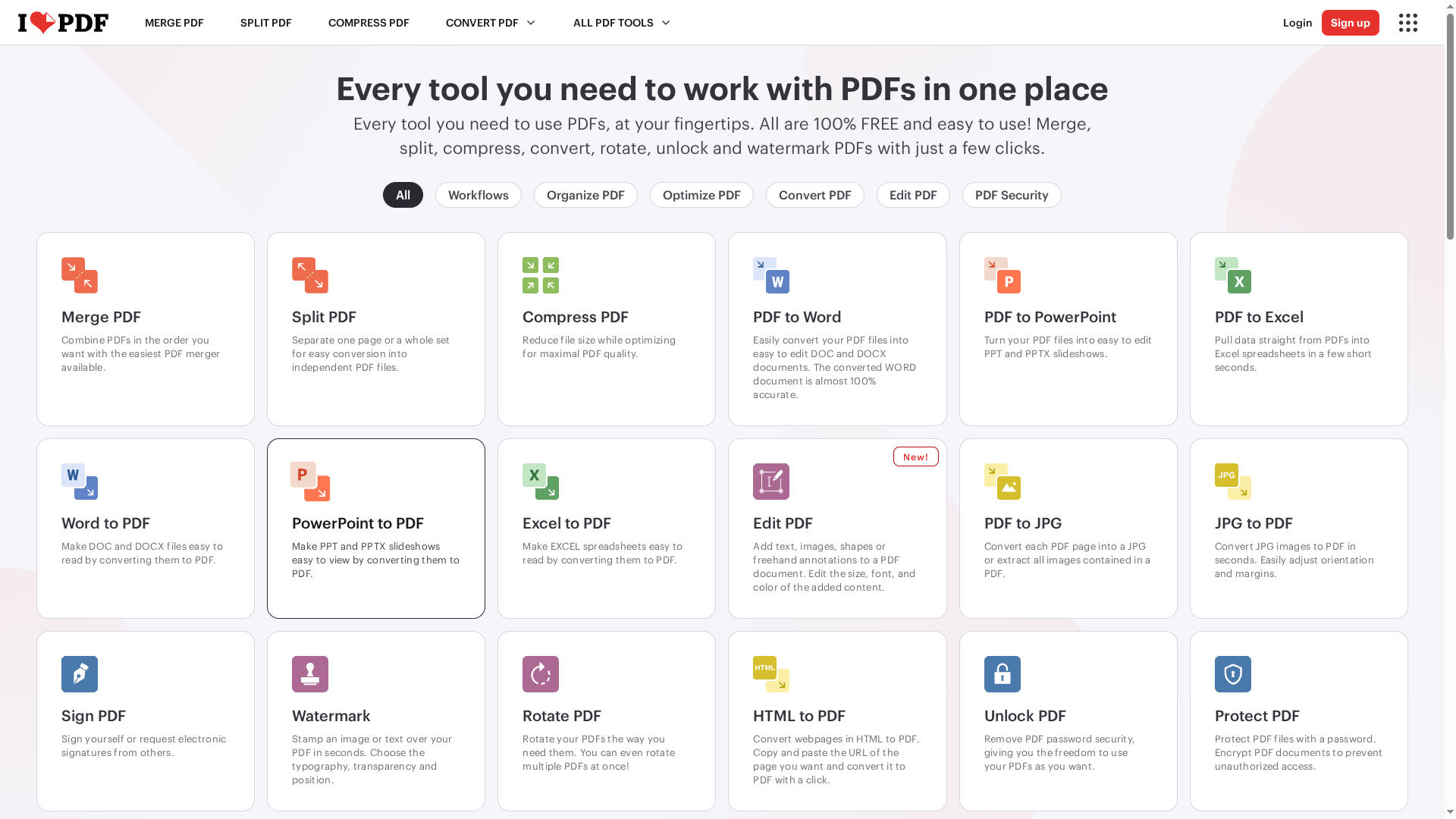
iLovePDF positions itself as a straightforward, all-in-one online PDF toolkit that covers everyday and business needs. Many core tools are available at no cost, and the platform supports web, mobile, and desktop workflows with an emphasis on data security. That said, power users will quickly hit paid limits for advanced or high-volume processing—so expect to upgrade if you need unlimited or enterprise-grade automation.
Core Features
iLovePDF bundles essential PDF tasks into a single interface: merge, split, compress, convert, rotate, unlock, and watermark PDFs. You can edit documents with text, images, shapes, and freehand annotations, then convert PDFs to Word, PowerPoint, Excel, or images and back again. Signature, password protection, and page-level organization (reorder, delete, add) are built in, along with batch processing across devices. The platform supports web-first workflows but also offers desktop clients for offline use when needed.
Pros
- Offers a wide range of PDF tools in one platform, which reduces the need to stitch multiple utilities together for common document tasks.
- Many core tools are free and user-friendly, allowing quick processing without a steep learning curve.
- Supports batch processing and integration across web, mobile, and desktop devices, helping teams maintain a consistent workflow.
- Places a strong focus on security with encryption and GDPR compliance, which matters for regulated or privacy-sensitive document handling.
- Handles both simple edits and advanced conversions, making it useful for varied roles from admin staff to document specialists.
Cons
- Some features are limited in the free plan, which means higher-volume or repeated tasks will require a premium subscription.
- Certain advanced features and bulk processing options are only available in paid plans, so automation at scale may be constrained without upgrading.
- The online tools are reliant on an internet connection, and offline capabilities are limited unless you move to the desktop application.
Who It’s For
iLovePDF is a good fit for individuals, students, and small-to-medium teams that need reliable, easy-to-learn PDF tools without heavy infrastructure. It also serves administrative, legal, and educational users who require secure signing, redaction-ready workflows, and simple batch conversions. If your workflow depends on large-scale automation or full offline processing, expect to evaluate the paid tiers or desktop clients.
Unique Value Proposition
The platform’s strength is simplicity: a single, secure place to perform almost every common PDF task, accessible from a browser or mobile device. For organizations seeking a low-friction way to standardize PDF handling across teams, iLovePDF offers a clear, affordable entry point with predictable upgrade paths.
Real World Use Case
A small business converts invoices to PDF for archiving, compresses files for email distribution, and collects electronic signatures on contracts—using the web interface for day-to-day tasks and the desktop client when offline processing is required.
Pricing
Free access with limited features; Premium plans start at $5/month (billed annually) for unlimited access and additional capabilities, with customized plans available for businesses.
Website: https://ilovepdf.com
PDFSimpli

At a Glance
PDFSimpli is a straightforward, browser-based PDF toolkit tailored to users who need fast editing, converting, and signing without installing software. It combines common document tasks—conversion, e-signatures, compression, and template creation—into a single online experience with a clear focus on simplicity and security. For individuals and small to medium-sized businesses that prioritize speed and convenience, PDFSimpli delivers core PDF workflows reliably. It’s not an enterprise heavyweight, but it gets the job done where agility matters.
Core Features
PDFSimpli provides web-based PDF editing and conversion plus support for multiple file formats including Word, Excel, PowerPoint, JPG, and PNG. Core capabilities include electronic signatures, splitting and merging PDFs, file compression, watermarking, and template creation for repeatable documents. The platform also offers OCR-style text extraction tools and translation and document creation utilities, all accessible from the browser—no downloads or local installs required. Security and privacy commitments are emphasized as part of the service.
Pros
- User-friendly online interface: The platform is built around a simple, browser-first workflow that reduces onboarding time and avoids local installs.
- Broad file format support: You can convert to and from Word, Excel, PowerPoint, and common image formats, which minimizes format friction in mixed workflows.
- E-signature and template capabilities: Built-in signing and reusable templates speed up routine business processes like invoicing and contract delivery.
- No software installation required: Because it runs in the browser, you can complete tasks on different machines quickly and without admin rights.
- Security and privacy focus: The service highlights a commitment to user data protection, which matters when you handle invoices, contracts, and client files.
Cons
- Limited free usage details are unspecified: The public information does not clarify exact free-tier limits, which makes trial planning uncertain for cost-conscious teams.
- Premium features likely require subscription: Several advanced capabilities appear gated behind paid plans, so expect to move off free tiers for heavier use.
- Free-tier upload and size restrictions possible: The platform indicates some limits on file size and number of uploads in the free tier, which could interrupt bulk processing workflows.
Who It’s For
PDFSimpli fits individuals, freelancers, and small to medium-sized businesses that need reliable, browser-based PDF tools without the overhead of installed software or complex enterprise licensing. If your workflows focus on occasional conversions, signing, and simple form or template creation, PDFSimpli is a pragmatic choice.
Unique Value Proposition
PDFSimpli’s unique value lies in packaging essential PDF tasks—conversion, signing, compression, and templates—into a single, secure web application that eliminates installation friction. It prioritizes speed and accessibility, letting nontechnical users perform common document tasks in minutes.
Real World Use Case
A small business owner converts client invoices from Word to PDF, compresses large attachments, applies a digital signature, and merges multiple documents into a client-ready packet—all from a browser session during a single workday. No software installs, no IT tickets. Fast and practical.
Pricing
PDFSimpli offers various plans including a 14-day limited access plan and subscription-based options with auto-renewal; specific price points are not provided in the available content, so you’ll need to check the site for plan details and billing terms.
Website: https://pdfsimpli.com
Foxit PDF Software & Tools
At a Glance
Foxit PDF Software & Tools is a business-focused PDF platform that blends comprehensive document creation, editing, and legally binding e-signatures with AI-assisted automation and deep platform integrations. It’s positioned as a cost-effective alternative to larger incumbents, delivering strong security and cross-platform availability. If you need scalable PDF workflows tied into Salesforce, Microsoft, or Google ecosystems, Foxit is worth evaluating.
Core Features
Foxit offers unlimited document creation and e-signing inside Salesforce and supports end-to-end automation using Salesforce flows, which simplifies repetitive contract and form processes. Foxit AI adds workflow simplification and data extraction capabilities, while core PDF functions—create, edit, manage, and sign—are available across Windows, MacOS, iOS, Android, and browser-based clients. The suite emphasizes secure, legally binding e-signatures plus integrations designed to keep documents moving through established enterprise systems.
Pros
- Cost-effective alternative: Foxit is positioned as a lower-cost option compared to big-name competitors, helping organizations reduce per-seat software spend.
- Fast, user-friendly editing: The interface and tools are designed for speed, allowing teams to edit and assemble documents with minimal friction.
- Broad feature set with AI and integrations: Built-in AI and native integrations with Salesforce, Microsoft, and Google expand automation and connectivity without bespoke development.
- Strong security and compliance focus: The product emphasizes secure handling and compliance, which is essential for regulated industries like finance and healthcare.
- Multi-platform availability: Full support across desktop, mobile, and browser clients enables consistent workflows for remote and distributed teams.
Cons
- Feature volume brings a learning curve: The extensive feature set can be overwhelming, and new users may need time or training to use advanced capabilities effectively.
- Premium features may cost extra: Certain higher-tier or advanced capabilities require additional purchases or subscription tiers, which can affect total cost of ownership.
- Advanced editing may lag specialized tools: Some users seeking highly advanced, niche editing features may find limitations compared to specialized desktop editors.
Who It’s For
Foxit suits businesses and professionals who need a secure, scalable PDF platform with AI capabilities and strong integrations—especially organizations already invested in Salesforce, Microsoft 365, or Google Workspace. It fits IT teams and document workflow professionals looking to reduce licensing costs while retaining enterprise controls and automation.
Unique Value Proposition
Foxit combines enterprise-grade PDF and e-signature functionality with AI-driven automation and native Salesforce integration, delivering a practical, lower-cost substitute to larger vendors. That combination of affordability, security, and automation is the core reason enterprises choose it for high-volume document workflows.
Real World Use Case
A financial organization uses Foxit to create, review, and sign loan documents end-to-end: AI extracts borrower data, Salesforce flows route documents for approval, and legally binding e-signatures complete the process—reducing manual steps, speeding turnaround, and improving auditability.
Pricing
Pricing details are not explicit on the website; Foxit offers free trials and flexible licensing including subscription plans and volume discounts. Expect tiered plans where premium automation or enterprise features are licensed separately.
Website: https://foxit.com
PDF Tools Comparison
This table compares various PDF tools in terms of their features, pros, cons, pricing, and usability to help you make an informed decision.
| Product | Key Features | Pros | Cons | Pricing |
|---|---|---|---|---|
| Mapsoft | Adobe® focus, Acrobat® plug-ins, PDF Hub, custom development | Adobe-centric, free trials, tailored solutions, web-based management, active roadmap | No public pricing, enterprise-focused | Custom pricing based on needs |
| iLovePDF | Merge, split, compress, annotate, batch processing, cross-device | Wide range of tools, user-friendly, secure, free tools | Free plan limits, reliance on internet, paid upgrades needed for advanced use | Free with $5/month premium plan |
| PDFSimpli | Web-based, conversion, e-signatures, OCR-style tools, templates | User-friendly, broad format support, secure, no software install | Unclear free usage limits, likely need subscription, potential upload restrictions | Subscription plans available |
| Foxit | Document creation, e-signatures, AI automation, Salesforce integration | Cost-effective, fast editing, secure, multi-platform, strong integrations | Steep learning curve, extra cost for premium features, limitations for niche editing | Free trials, flexible licensing |
Optimize Your PDF Workflows with Mapsoft’s Adobe-Centric Solutions
The “Best pdf management solutions for businesses – Expert Comparison 2025” article highlights key challenges many organizations face: streamlining PDF workflows, ensuring secure and scalable document processing, and integrating deeply with Adobe Acrobat environments. If your goal is to reduce manual PDF handling, boost productivity, and maintain control over complex document processes, you need a partner who understands these pain points and can tailor solutions accordingly. Mapsoft specializes in overcoming these hurdles by enhancing Adobe Acrobat with powerful plug-ins, web tools, and custom development designed specifically for enterprise needs.
Unlock advanced features like converting PDFs to and from multiple formats, batch automation, metadata management, and secure document optimization with Mapsoft PDF Hub. This platform enables businesses to automate large-scale PDF processing while maintaining flexibility and compliance. Discover how our offerings align perfectly with your pursuit of efficient, reliable PDF management in our Digital Preservation category where we focus on safeguarding document integrity and workflow continuity.
Take control of your document challenges today. Visit Mapsoft.com to explore our complete suite of Adobe Acrobat enhancements and workflow automation tools. See how tailored plug-ins and expert consulting can transform the way your team manages PDF documents — don’t wait to experience seamless workflows that keep your business moving forward. Learn more about our solutions in the Uncategorized category and start optimizing your Adobe PDF environment now.
Frequently Asked Questions
What are the key features to look for in PDF management solutions for businesses?
When choosing a PDF management solution, prioritize features like document editing, e-signature capabilities, and secure file sharing. Look for platforms that also support batch processing and integration with other business tools to enhance efficiency.
How can PDF management solutions improve document workflows in a business?
PDF management solutions streamline document workflows by automating repetitive tasks and enhancing collaboration. To see improvements, start utilizing features like automated approvals and integrations for document storage, which can reduce processing times by approximately 30%.
What is the difference between cloud-based and on-premise PDF management solutions?
Cloud-based PDF management solutions offer accessibility from any device with internet access, improving collaboration across teams. In contrast, on-premise solutions may provide enhanced security and control over data, but require more IT resources for maintenance. Consider your team’s needs and choose accordingly.
How do I ensure the security of documents within a PDF management platform?
To ensure document security, select a PDF management solution that offers encryption, secure access controls, and compliance with data protection standards. Regularly review provider security policies and consider implementing team training on document handling practices to further enhance security.
Can PDF management solutions help with document compliance and regulation requirements?
Yes, many PDF management solutions are designed to assist with compliance by providing features like audit trails and secure e-signatures. Ensure to choose a solution that includes compliance tools relevant to your industry to streamline document management processes and stay compliant more easily.
What is the typical cost structure for PDF management solutions for businesses?
Costs for PDF management solutions vary widely based on features and user capacity requirements. Most solutions offer subscription pricing models, so evaluate the pricing plans based on your team size and anticipated document volume to choose the right solution for your budget.